All Activity
- Today
-
Zelda – A Link To The Past X by Team-Resurgent original github page [code]https://github.com/Team-Resurgent/Zelda-A-Link-To-The-Past-X[/code] [quote]A native Original Xbox port of zelda3, the open-source decompilation of The Legend of Zelda: A Link to the Past. Runs natively on Original Xbox hardware using Direct3D 8, DirectSound and XInput. Core Game Full game playable from start to end 60fps gameplay 720p output (falls back to 480p if not supported by your TV) 4:3 and 16:9 widescreen support Xbox-Specific Features In-game menu — Press L3 (left stick click) to open Save states — 10 save slots, fully integrated with the Xbox Dashboard memory manager. Delete individual save states directly from the dashboard. Dashboard-managed saves — SRAM and all save states appear in the Xbox Dashboard under Memory → Hard Drive. Users can copy saves to a memory unit or delete them from there. Turbo mode — Runs the game at 4x speed Pause with dim overlay Cheats menu — God mode (health, magic, bombs, arrows, rupees), fill/upgrade items, equipment and bottle management Settings menu — Toggle all enhanced features in-game Enhanced Features (toggleable in Settings) Dim flashes No low health beep Mirror to Dark World Turn while dashing Break pots with sword (Master Sword or better required) Collect items with sword Skip intro Show max items in yellow Carry 9999 rupees 4 active bombs Misc bug fixes Game-changing bug fixes Cancel bird travel Switch L/R item slots (secondary item slot system)[/quote] link below(includes all files) [code]https://www.mediafire.com/file/xbc57tlf2mxh1tk/zelda+-+a+link+to+the+past+x.zip/file[/code]
-
Super-Mario-World-X port by Team-Resurgent. github page [code]https://github.com/Team-Resurgent/Super-Mario-World-X[/code] [quote] A native Original Xbox port of super mario world, the open-source decompilation of Super Mario World. Also includes Super Mario Bros. 1 and Super Mario Bros. Lost Levels via the Super Mario All-Stars ROM. Runs natively on Original Xbox hardware using Direct3D 8, DirectSound and XInput. Xbox-Specific Features In-game menu — Press L3 (left stick click) to open Save states — 10 save slots per game, fully integrated with the Xbox Dashboard memory manager. Delete individual save states directly from the dashboard. Dashboard-managed saves — SRAM and all save states appear in the Xbox Dashboard under Memory → Hard Drive. Users can copy saves to a memory unit or delete them from there. Switch Game — Switch between Super Mario World, SMB1 and SMBLL from the in-game menu Turbo mode — Runs the game at 4x speed Pause with dim overlay Cheats menu — Add lives, power-ups and coins for all three games Settings menu — Toggle display mode and sprite limits in-game[/quote] link below(includes all the files for smw and both the other mario games) [code]https://www.mediafire.com/file/lxwrcc681kn6vho/super+mario+world+x.zip/file[/code]
-
WinArcadia 36.3 (Windows XP/Vista/7/8/10/11): 27 May 2026 DroidArcadia 4.54 (Android): 27 May 2026 AmiArcadia 36.3 (AmigaOS 3): 27 May 2026 AmiArcadia 36.3 (AmigaOS 4): 27 May 2026 AmiArcadia 36.2 (MorphOS): 19 May 2026 Super Bug Advance 1.31 (Game Boy Advance): 11 August 2025 AmiArcadia and WinArcadia are multi-emulators/assemblers/disassemblers of these machines: * Emerson Arcadia 2001 console family (Bandai, Emerson, Grandstand, Intervision, Leisure-Vision, Leonardo, MPT-03, Ormatu, Palladium, Poppy, Robdajet, Tele-Fever, Tempest, Tryom, Tunix, etc.) (c. 1982); * Interton VC 4000 console family (Acetronic, Cabel, Fountain, Hanimex, Interton, Prinztronic, Radofin, Rowtron, Soundic, Voltmace, Waddingtons, etc.) (c. 1978); * Elektor TV Games Computer (1979); * PIPBUG- and BINBUG-based machines (Electronics Australia 77up2 and 78up5, Signetics Adaptable Board Computer, Eurocard 2650, etc.) 1977-1978); * Signetics Instructor 50 trainer (1978); * Signetics TWIN minicomputer (1976); * Central Data 2650 microcomputer (1977); * PHUNSY microcomputer (c. 1980); * Ravensburger Selbstbaucomputer aka 2650 Minimal Computer trainer (1984); * Hofacker MIKIT 2650 trainer (1978); * Astro Wars, Galaxia, Laser Battle and Lazarian coin-ops by Zaccaria (1979-1981); * Malzak 1 and 2 coin-ops by Kitronix (c. 1981); * AY-3-8500/8550/8600-based Pong systems (Coleco Telstar Galaxy, Sheen TVG-201, etc.) (1976-1977); and * VTech Type-right machine (1985). Features include: ReAction GUI, load/save snapshots, windowed and full- screen modes, CPU tracing, trainer, drag and drop support, graphics scaling, automatic load/save of configuration/game, keyboard/joystick/ gamepad/paddle/mouse/trackball/Vision-dapter support, autofire, turbo mode, gameplay recording/playback, sprite demultiplexing, help windows, source code, debugger, frame skipping, redefinable keys, save screenshots (9 supported formats), REXX port, network play (IPv4 and IPv6), real-time monitor, locale support, game selection sidebar, text-to-speech, artefacting, support for ZIPped games, clipboard support, palette editor, memory editor, tone retuning, high score management, force feedback, sprite editor, 3D, assembler, CALM & IEEE-694 support, Scale2x/3x/4x and HQx filters, animation recording (4 supported formats), sound recording (8 supported formats), horizon dejittering, tape decks (4 supported formats), RetroAchievements support, printer emulation, floppy disk drive emulation, screen editor, papertape emulation, bezel display, industrial/scientific peripherals, magnifier. The supported languages are currently English, Dutch, French, German, Greek, Italian, Polish, Russian and Spanish. Changes since V36.2: Summary: * "Help|Host gamepad(s)/mouse..." subwindow: added Logitech Dual Action options (WinArcadia only). * Miscellaneous improvements and bug fixes. Details: interton: added gaming guide link for crazy crab. host pad(s) subwin: group labels now show which guest player each host pad/mouse is assigned to. wa: host pad(s) subwin: added "view as logitech dual action" options for each host gamepad. wa: host pad(s) subwin: fixed: memory for image was never being freed. host pad(s) subwin: user can now click on mouse buttons with mouse to give input. controls subwin: fixed: hovering over paddle direction areas was causing a crash/hang. interton: added unlimited lives, unlimited time/energy and invincibility trainers for munch & crunch. interton: improved overlay/instructions and host gamepad button assignments for munch & crunch. titlebar now says "(paused during frame)" instead of just "(paused)" when pausing mid-frame. wa: host pads subwin: added helpful tooltips for unassigned gamepads. wa: now when detecting user activity on an unassigned gamepad, assigns that gamepad automagically to the default player. debugger: now prepends hex values with $ rather than the style-specific prefix. fixed: guide ray position was not being updated after eg. several "run to rastline" commands in the same frame. wa: uvi/pvi monitor: tooltips now show an interpretation of the current contents of the address. -------------------------------------------------------------------------- DroidArcadia is the Android port of the AmiArcadia/WinArcadia emulator. These machines are emulated: * Emerson Arcadia 2001 console family (Bandai, Emerson, Grandstand, Intervision, Leisure-Vision, Leonardo, MPT-03, Ormatu, Palladium, Poppy, Robdajet, Tele-Fever, Tempest, Tryom, Tunix, etc.) (c. 1982); * Interton VC 4000 console family (Acetronic, Cabel, Fountain, Hanimex, Interton, Prinztronic, Radofin, Rowtron, Soundic, Voltmace, Waddingtons, etc.) (c. 1978); * Elektor TV Games Computer (1979); * Astro Wars, Galaxia, Laser Battle and Lazarian coin-ops by Zaccaria (1979-1981); and * Malzak 1 and 2 coin-ops by Kitronix (c. 1981). Features include: artefacting, autofire, force feedback, frame skipping, game help, gamepad support, high score management, horizon dejittering, locale support, save screenshots, saved states, sprite demultiplexing, tone retuning, trainers, artefacting, support for ZIPped games, DIP switch editor, RetroAchievements support. The emulator can be used standalone, or with the ES-DE or LaunchBox frontends. The supported languages are currently English, Dutch, French, German, Greek, Italian, Polish and Spanish. Changes since V4.53: Summary: * Miscellaneous improvements. Details: interton: added gaming guide link for crazy crab. interton: added unlimited lives, unlimited time/energy and invincibility trainers for munch & crunch. interton: improved overlay/instructions and host gamepad button assignments for munch & crunch. http://amigan.1emu.net/releases/ http://amigan.yatho.com
- Last week
-
Just tried umk3, settings are saved and restored correctly. Must be something in your setup. Make sure the path to nvram is fully qualified, not just "nvram".
-
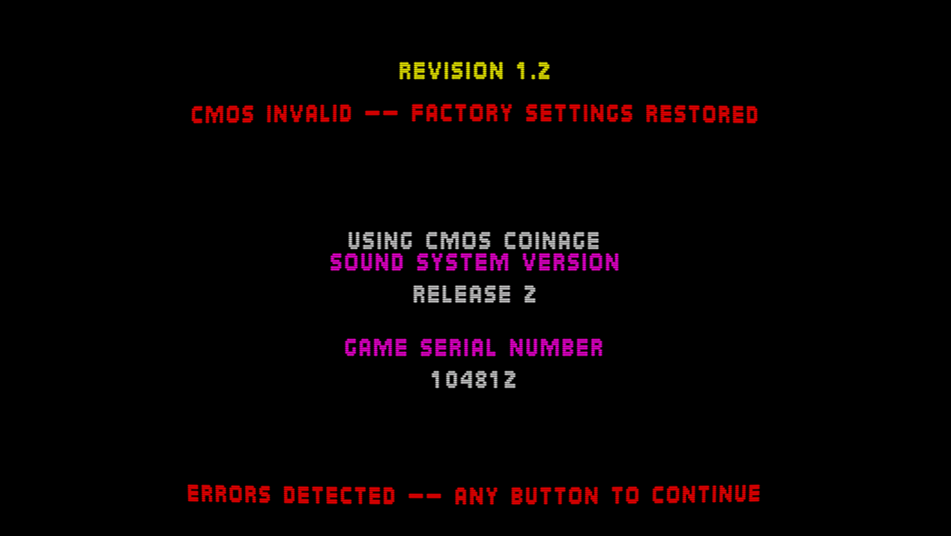
Hi, not sure if this is from MAME in general or specific of MAMEUI, but lately my CMOS settings are not being saved, for example each time I boot UMK3 the settings are reset and I have to get into the Test Menu and change them.
- Earlier
-
WinArcadia 36.2 (Windows XP/Vista/7/8/10/11): 19 May 2026 DroidArcadia 4.53 (Android): 19 May 2026 AmiArcadia 36.2 (AmigaOS 3): 19 May 2026 AmiArcadia 36.2 (AmigaOS 4): 19 May 2026 AmiArcadia 36.11 (MorphOS): 29 April 2026 Super Bug Advance 1.31 (Game Boy Advance): 11 August 2025 AmiArcadia and WinArcadia are multi-emulators/assemblers/disassemblers of these machines: * Emerson Arcadia 2001 console family (Bandai, Emerson, Grandstand, Intervision, Leisure-Vision, Leonardo, MPT-03, Ormatu, Palladium, Poppy, Robdajet, Tele-Fever, Tempest, Tryom, Tunix, etc.) (c. 1982); * Interton VC 4000 console family (Acetronic, Cabel, Fountain, Hanimex, Interton, Prinztronic, Radofin, Rowtron, Soundic, Voltmace, Waddingtons, etc.) (c. 1978); * Elektor TV Games Computer (1979); * PIPBUG- and BINBUG-based machines (Electronics Australia 77up2 and 78up5, Signetics Adaptable Board Computer, Eurocard 2650, etc.) 1977-1978); * Signetics Instructor 50 trainer (1978); * Signetics TWIN minicomputer (1976); * Central Data 2650 microcomputer (1977); * PHUNSY microcomputer (c. 1980); * Ravensburger Selbstbaucomputer aka 2650 Minimal Computer trainer (1984); * Hofacker MIKIT 2650 trainer (1978); * Astro Wars, Galaxia, Laser Battle and Lazarian coin-ops by Zaccaria (1979-1981); * Malzak 1 and 2 coin-ops by Kitronix (c. 1981); * AY-3-8500/8550/8600-based Pong systems (Coleco Telstar Galaxy, Sheen TVG-201, etc.) (1976-1977); and * VTech Type-right machine (1985). Features include: ReAction GUI, load/save snapshots, windowed and full- screen modes, CPU tracing, trainer, drag and drop support, graphics scaling, automatic load/save of configuration/game, keyboard/joystick/ gamepad/paddle/mouse/trackball/Vision-dapter support, autofire, turbo mode, gameplay recording/playback, sprite demultiplexing, help windows, source code, debugger, frame skipping, redefinable keys, save screenshots (9 supported formats), REXX port, network play (IPv4 and IPv6), real-time monitor, locale support, game selection sidebar, text-to-speech, artefacting, support for ZIPped games, clipboard support, palette editor, memory editor, tone retuning, high score management, force feedback, sprite editor, 3D, assembler, CALM & IEEE-694 support, Scale2x/3x/4x and HQx filters, animation recording (4 supported formats), sound recording (8 supported formats), horizon dejittering, tape decks (4 supported formats), RetroAchievements support, printer emulation, floppy disk drive emulation, screen editor, papertape emulation, bezel display, industrial/scientific peripherals, magnifier. The supported languages are currently English, Dutch, French, German, Greek, Italian, Polish, Russian and Spanish. Changes since V36.11: Summary: * Enhanced "Help|Host gamepads/mouse..." subwindow. * Miscellaneous improvements and bug fixes. Details: "echo i/o to console?" toggle now emits an EOL when the VDU cursor has wrapped (helps with funny farm races). fixed: when loading a game for a different guest, eg. from sidebar, narrow/wide setting was not being set according to the new guest. wa: host pads subwin: now uses a real photo of gameware gamepad. qwerty machines: when using guest keyboard mapping, now supports eg. Shift+L for backslash. wa: pausing via gamepad now waits until the end of the frame. wa: opcodes subwin: fixed: "hover..." text was in wrong position and not localized. wa: galaxia: fixed: some background areas were not being rendered correctly when enhanced skies was on. wa: updated RAIntegration from V1.4.0 to V1.4.2. host pads subwin: user can now click on pad buttons with mouse to give input. wa: host pads subwin now only shows one host gamepad if only one is connected. various code-level improvements. wa: fixed various bugs in controls subwin. arcadia: fixed: palladium keys were not being mapped correctly. incorporated Stefan's latest German translation. wa: fixed: when using enhanced skies, changing machines could leave remnant imagery on screen. debugger: COVER command: now prepends hex values with $ rather than the style-specific prefix. interton: added an unlimited lives trainer for monster man. -------------------------------------------------------------------------- DroidArcadia is the Android port of the AmiArcadia/WinArcadia emulator. These machines are emulated: * Emerson Arcadia 2001 console family (Bandai, Emerson, Grandstand, Intervision, Leisure-Vision, Leonardo, MPT-03, Ormatu, Palladium, Poppy, Robdajet, Tele-Fever, Tempest, Tryom, Tunix, etc.) (c. 1982); * Interton VC 4000 console family (Acetronic, Cabel, Fountain, Hanimex, Interton, Prinztronic, Radofin, Rowtron, Soundic, Voltmace, Waddingtons, etc.) (c. 1978); * Elektor TV Games Computer (1979); * Astro Wars, Galaxia, Laser Battle and Lazarian coin-ops by Zaccaria (1979-1981); and * Malzak 1 and 2 coin-ops by Kitronix (c. 1981). Features include: artefacting, autofire, force feedback, frame skipping, game help, gamepad support, high score management, horizon dejittering, locale support, save screenshots, saved states, sprite demultiplexing, tone retuning, trainers, artefacting, support for ZIPped games, DIP switch editor, RetroAchievements support. The emulator can be used standalone, or with the ES-DE or LaunchBox frontends. The supported languages are currently English, Dutch, French, German, Greek, Italian, Polish and Spanish. Changes since V4.52: Summary: * Miscellaneous improvements and bug fixes. Details: galaxia: fixed: some background areas were not being rendered correctly when enhanced skies was on. interton: added an unlimited lives trainer for monster man. http://amigan.1emu.net/releases/ http://amigan.yatho.com
-

MAMElicious - Home of MAME's INI Files
Robert replied to mame-licious's topic in Arcade Emulators [/pc/arcade]
Site was deleted by the user. -

Ace Driver Collection - v1.0.0 (New xbox 360 Release)
fumanchu replied to fumanchu's topic in XBOX 360 Hacks [/xbox360]
Ace Driver Collection v1.0.1 released Fixed an issue that prevented controller keys from being rebound. Fixed a polling issue that would kill acceleration when switching camera view. new link [code]https://www.mediafire.com/file/uyrsarwfnaejlwr/AceDriverCollection.rar/file[/code] -
Ace Driver Collection - v1.0.0 by wans zai release info This is the first release of the Ace Driver System 22 Collection for Xbox 360. This is an arcade emulator designed to run the Ace Driver games on Xbox 360 hardware at full speed in HD with native 16:9 rendering. What's in this build. Play both games, Ace Driver Racing Evolution and Ace Driver Victory Lap, in offline solo mode. First pass of the force feedback is implemented. In Victory Lap, I still need to map more addresses — right now it only tracks collisions. 16:9 / 4:3 toggle. Smooth / Sharp filter toggle. Scanlines toggle. Volume scaling. What's in progress. System Link / Online play. Car and difficulty select — difficulty currently only adds time and does not adjust AI behaviour. Further force feedback adjustments and mapping additional feedback offsets. link to github page [code]github.com/wanszai/Ace-Driver-Collection-X360-Releases[/code] youtube vid [code]https://www.youtube.com/watch?v=S9FWQDTUOok[/code] link(includes all the files and roms needed) [code]https://www.mediafire.com/file/bm5uom9dx1g9g8r/AceDriverCollection.rar/file[/code]
-
lua 5.5 has appeared in arch, but in 64 bits only for now, making the 32 bit version of raine output an error about an undefined reference to luaL_openselectedlibs when compiling from source. The workaround is to explicitly use lua5.4 and not just lua in the makefile, I have pushed a new commit for that. I guess most of those who use the PKGCONFIG for arch use the 64 bits version, so they shouldn't need an update.
-
thats the only one i have got as it is the newest and most complete version.if you want mario 64 in that resolution then maybe you would be better off emulatng it with the n64 emulator for xbox called surreal64.
-
You're becoming annoying, you can take a break for a while to calm down.
-

question: icons supported colors & transparency
mame-licious replied to mame-licious's topic in MameUI
- Please answer my question, otherwise this thread is useful. This is the 2nd time you ignore a question (in another thread too my question about software list machines) - I don't create duplicate threads! This forum is so slow that when I post something, my browser is loading more then a minute, I get "gateway timeout" and then the SAME thread is posted twice. So I can't possibly be helt responsible for the slowness of this forum and the responding browser who sends the request one more time... Thanks :) -
Works for me, i don't get any white background. Please stop creating duplicate threads, this is the 3rd time you've done it.
-
question: icons supported colors & transparency
mame-licious replied to mame-licious's topic in MameUI
And when going from custom made icons to the built-in ones (by removing the icons path in the settings) and restarting the app, suddenly the chips have a white background too! Any idea what's causing this and how to solve it? It must remember something since the icons path is completely REMOVED and the built-in icons have a transparent background See https://ibb.co/LzGZ35S4 -
MAMEUI request: parent/clone universal icon color
mame-licious replied to mame-licious's topic in MameUI
Hmm what do you mean? And to which question is this an answer? Yes they can: if you put in the "icons" folder icons with names "imperfect.ico", "roms.ico" and "warning.ico". Those override the chip icons then. So my question was: after this new update, will this behavior still be working or when are the icons, as written above, used in case of the 3-state checkbox? It's not clear at all because you only talk about the driver icons (romsetname.ico) and not about these. So which icons (the above) or the driver icons gets precedence over each other and this for each of the 3-states that are introduced now? -
Hi I know the MAMEUI code is old but I was wondering if you can tell me the icon's number of supported colors (like 256, ...) and if transparent background of the icon is supported. Do you maybe know this or can you find it in the widget API that is used? I'm making some icons and for now I can't make a transparent background appear. It displays as white. See https://ibb.co/vvcrVxrY
-
The chip icons and the red X are built into the app and cannot disappear.
-
MAMEUI request: parent/clone universal icon color
mame-licious replied to mame-licious's topic in MameUI
After this update, will the icons as seen here in attachment will still be working? -
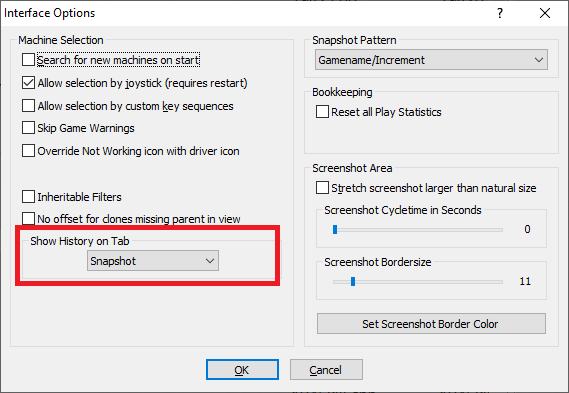
bug: MAMEUI64 0.287.0: show history on tab not working
Robert replied to mame-licious's topic in MameUI
It works, but you have to turn off the History tab. You can't have history displaying on 2 tabs at the same time.- 1 reply
-
- 1
-

-
hi Please look at screenshot, indicated feature. No matter what tab you choose, the history.xml text is still displayed on it's own "history" tab. So no matter what you choose, nothing happens. Is this a bug or a feature that's not working anymore and should be removed? What should (or did) it do?
-
is possible to have 4/3 version instead of widescreen?
-
ok works even on stock xbox
-
MAMEUI request: parent/clone universal icon color
mame-licious replied to mame-licious's topic in MameUI
I live in Apple world and until now I never seen any checkbox with 3 states. It's maybe existing too but I didn't see it anywhere. What about my question about software list machines? -
CHM files are a lot of work and microsoft considers them as a security risk, so no. Don't have the time to deal with it. 3-state checkboxes have been around for ages. To see one in action, right-click on a folder and look at the properties. Click on the "Read-only" checkbox and you can see it goes through 3 different states. There's no need for me to explain how they work, everyone knows. Driver icons are a specific icon per game. You can get them from the usual places. Again, they've been around for at least 20 years, and they've always been in MAMEUI.