All Activity
- Past hour
-
can you reupload it on mediafire please, link is dead
-

Sonicmania Port (new xbox 360 release)
Arnold101 replied to fumanchu's topic in XBOX 360 Hacks [/xbox360]
can you add sonic mania with dlc too please? - Today
-
I found that the working parent icon resource was green in arcade and grey in mameui/hbmame. So I copied the arcade resource object across, and now the working icon is green in mameui/hbmame. I still want to have the red X as an option which will mean an extra choice in the interface options. If you don't choose it you get the red chip, if you do you get the red X. About the grey chips, there 2 kinds, one with a ? to indicate it hasn't been scanned at all, and the other one has the stop sign to indicate it has been scanned and some roms are missing.
-

Ami/WinArcadia 36.11 & DroidArcadia 4.52 released
Minuous posted a topic in Emulator Releases [/emu]
WinArcadia 36.11 (Windows XP/Vista/7/8/10/11): 29 April 2026 DroidArcadia 4.52 (Android): 29 April 2026 AmiArcadia 36.11 (AmigaOS 3): 29 April 2026 AmiArcadia 36.11 (AmigaOS 4): 29 April 2026 AmiArcadia 36.1 (MorphOS): 29 March 2026 Super Bug Advance 1.31 (Game Boy Advance): 11 August 2025 AmiArcadia and WinArcadia are multi-emulators/assemblers/disassemblers of these machines: * Emerson Arcadia 2001 console family (Bandai, Emerson, Grandstand, Intervision, Leisure-Vision, Leonardo, MPT-03, Ormatu, Palladium, Poppy, Robdajet, Tele-Fever, Tempest, Tryom, Tunix, etc.) (c. 1982); * Interton VC 4000 console family (Acetronic, Cabel, Fountain, Hanimex, Interton, Prinztronic, Radofin, Rowtron, Soundic, Voltmace, Waddingtons, etc.) (c. 1978); * Elektor TV Games Computer (1979); * PIPBUG- and BINBUG-based machines (Electronics Australia 77up2 and 78up5, Signetics Adaptable Board Computer, Eurocard 2650, etc.) 1977-1978); * Signetics Instructor 50 trainer (1978); * Signetics TWIN minicomputer (1976); * Central Data 2650 microcomputer (1977); * PHUNSY microcomputer (c. 1980); * Ravensburger Selbstbaucomputer aka 2650 Minimal Computer trainer (1984); * Hofacker MIKIT 2650 trainer (1978); * Astro Wars, Galaxia, Laser Battle and Lazarian coin-ops by Zaccaria (1979-1981); * Malzak 1 and 2 coin-ops by Kitronix (c. 1981); * AY-3-8500/8550/8600-based Pong systems (Coleco Telstar Galaxy, Sheen TVG-201, etc.) (1976-1977); and * VTech Type-right machine (1985). Features include: ReAction GUI, load/save snapshots, windowed and full- screen modes, CPU tracing, trainer, drag and drop support, graphics scaling, automatic load/save of configuration/game, keyboard/joystick/ gamepad/paddle/mouse/trackball/Vision-dapter support, autofire, turbo mode, gameplay recording/playback, sprite demultiplexing, help windows, source code, debugger, frame skipping, redefinable keys, save screenshots (9 supported formats), REXX port, network play (IPv4 and IPv6), real-time monitor, locale support, game selection sidebar, text-to-speech, artefacting, support for ZIPped games, clipboard support, palette editor, memory editor, tone retuning, high score management, force feedback, sprite editor, 3D, assembler, CALM & IEEE-694 support, Scale2x/3x/4x and HQx filters, animation recording (4 supported formats), sound recording (8 supported formats), horizon dejittering, tape decks (4 supported formats), RetroAchievements support, printer emulation, floppy disk drive emulation, screen editor, papertape emulation, bezel display, industrial/scientific peripherals, magnifier. The supported languages are currently English, Dutch, French, German, Greek, Italian, Polish, Russian and Spanish. Changes since V36.1: Summary: * Miscellaneous improvements and bug fixes. Details: arcadia: improved game help for jump bug and jungler. assembler: now warns when assembly is about to cross an 8K page boundary. disassembler: signetics: fixed disassembly of DB directives. interton: added unlimited lives and time trainers for crazy crab. arcadia,interton,elektor: fixed: sprites were sometimes being demultiplexed when they should not have been. disassembler/tracer: fixed: some instructions and directives had incorrect space padding. disassembler/tracer: fixed: prefix for bit masks was incorrect in pseudocode. disassembler/tracer: no longer treats PSW flags as address labels. L I command: fixed: warnings about unusual memory regions did not take account of wrapping. arcadia: game help subwin: added mpt-03 box imagery for parashooter. improved various logging messages. various code-level improvements. aa: fixed: "Debug|Settings|WARN" menu item was unresponsive. -------------------------------------------------------------------------- DroidArcadia is the Android port of the AmiArcadia/WinArcadia emulator. These machines are emulated: * Emerson Arcadia 2001 console family (Bandai, Emerson, Grandstand, Intervision, Leisure-Vision, Leonardo, MPT-03, Ormatu, Palladium, Poppy, Robdajet, Tele-Fever, Tempest, Tryom, Tunix, etc.) (c. 1982); * Interton VC 4000 console family (Acetronic, Cabel, Fountain, Hanimex, Interton, Prinztronic, Radofin, Rowtron, Soundic, Voltmace, Waddingtons, etc.) (c. 1978); * Elektor TV Games Computer (1979); * Astro Wars, Galaxia, Laser Battle and Lazarian coin-ops by Zaccaria (1979-1981); and * Malzak 1 and 2 coin-ops by Kitronix (c. 1981). Features include: artefacting, autofire, force feedback, frame skipping, game help, gamepad support, high score management, horizon dejittering, locale support, save screenshots, saved states, sprite demultiplexing, tone retuning, trainers, artefacting, support for ZIPped games, DIP switch editor, RetroAchievements support. The emulator can be used standalone, or with the ES-DE or LaunchBox frontends. The supported languages are currently English, Dutch, French, German, Greek, Italian, Polish and Spanish. Changes since V4.51: Summary: * Miscellaneous improvements and bug fixes. Details: arcadia: improved game help for jump bug and jungler. fixed: wrong version number was being reported to retroachievements server. interton: added unlimited lives and time trainers for crazy crab. arcadia,interton,elektor: fixed: sprites were sometimes being demultiplexed when they should not have been. http://amigan.1emu.net/releases/ http://amigan.yatho.com -
* SDLMAME 0.287 for Ubuntu - https://sdlmame.wallyweek.org/download/ * MEmu v9.5.2 [Android] - https://www.memuplay.com/blog/en/category/release-notes * Applewin v1.31.0.4 [Apple II] - https://github.com/AppleWin/AppleWin/releases * HBMAME 0.245.32 [Arcade] - https://hbmame.1emulation.com/ * GearColeco v1.6.0 [Colecovision] - https://github.com/drhelius/Gearcoleco/releases * GearBoy v3.8.3 [Gameboy] - https://github.com/drhelius/Gearboy/releases * GearSystem v3.9.6 [Genesis] - https://github.com/drhelius/Gearsystem/releases * GearLynx v1.2.10 [Atari Lynx] - https://github.com/drhelius/Gearlynx/releases * JGenesis v0.12.0 [Multiple systems] - https://github.com/jsgroth/jgenesis/releases * Gopher64 v1.1.19 [N64] - https://github.com/gopher64/gopher64/releases * GearGrafx v1.7.5 [PCE] - https://github.com/drhelius/Geargrafx/releases * SpecEmu v3.4 [Sinclair] - https://specemu.zxe.io/ * ExtraMame v26.4 [Front-end] - https://www.wintools.net/extramame/ * pfemame v3.4.4 [Front-end] - https://sourceforge.net/projects/pfemame/files/pfemame_windows_v3.4.4.zip/download * Simple Launcher v5.3.3 [Front-end] - https://github.com/drpetersonfernandes/SimpleLauncher/releases * clrmame v0.7.1 [Rom Manager] - https://mamedev.emulab.it/clrmamepro/
- Last week
-

MAMEUI request: parent/clone universal icon color
mame-licious replied to mame-licious's topic in MameUI
I looked at how ARCADE is doing it and there working parents are green chips. And even more, I like the way the icon chip colors are used in ARCADE more and I would like to ask if you want to apply the icon colors of ARCADE to MAMEUI because they are much better and intuitive for beginners too. ARCADE: - working parent: green chip (example "wboy") / working clone: lighter green chip (example "wboy2") - not working parent or clone: red chip (example "wheelfir") - partially working parent or clone: yellow chip (example "wow") - missing roms for parent or clone: grey chip (example "warlords") Why is this better then current MAMEUI icons? You can immediately see working (green), partially working (yellow) or not working (red) while missing roms are grey chips. MAMEUI is displaying grey for working parents and a red cross for not working parents/clones. The grey chip for working parents can create a lot of confusion and the red cross for not working parents/clones could better be replaced by a red chip (since the green and yellow chips also are complemented logically with a red chip for not working games) It's more consistent and intuitive if the chips are used for ALL green/yellow/red status. And in addition grey chips should be used for MISSING roms (grey is now used for working parents in MAMEUI which is totally not-intuitive !!!).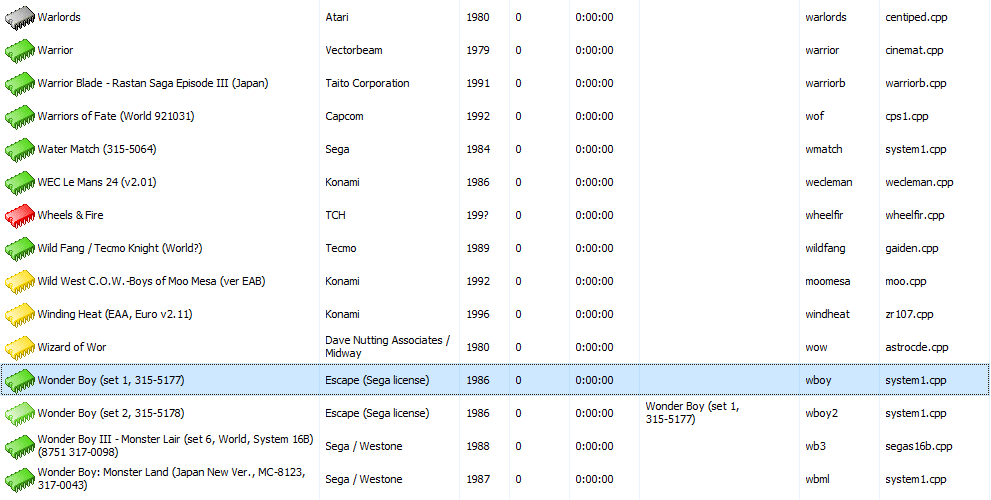
-
MAMEUI request: parent/clone universal icon color
mame-licious replied to mame-licious's topic in MameUI
You can see the yellow color for parents is working, because if you look at the screenshot, there are 4 games displayed yellow and they are all parent machines. So if you apply my request, chips having grey color will be completely eliminated from the games list because: - parents can already have yellow color chips (this behavior is already correct right now) - parents that WERE grey will be converted to green (if you apply my request) and this eliminates grey color chips completely This makes the game list have universal yellow/green colors for parents and clones and this is according to me the best to display them. I hope you can apply this change -
Hi For some reason the chip color for a working parent is grey but the chip color of a working clone of this parent is green. I don't know if this is a bug, but it's applied everywhere for each parent/clone available. A parent, for this reason, can NEVER have a green chip color. According to me there is no need to have a color difference between a working parent or its working clones. It makes sense to display them all green, no matter if it's a parent or clone. Would you be interested to change working parent icon's color to green, the same as their clones? It's very confusing the way it works now (the proof is that I was confused about this for days until I found out this specific behavior in MAMEUI) Below a screenshot of the latest MAMEUI version: - wboy is a parent, working, but grey color - wboy2 is a clone of wboy, working, and green color

-
MAMEUI official website: Icons folder missing
mame-licious replied to mame-licious's topic in MameUI
I finally found what's going on: for some reason parents have grey chips and clones have green chips (if the status is working). Can you confirm this is the intended behavior? I opened a request to change this behavior slightly. See: https://www.1emulation.com/forums/topic/37896-mameui-request-parentclone-universal-icon-color/ -
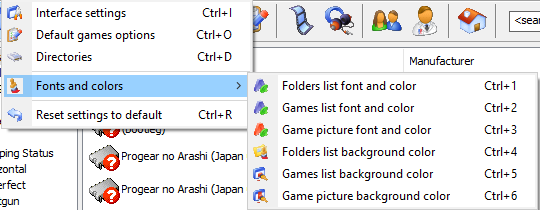
Hi One thing that's better in ARCADE are the more font & color settings possible. MAMEUI just uses 1 font & color for everything. It's too limited anno 2026. Would you be interested to port the existing settings in ARCADE to MAMEUI? In MAMEUI choosing a background image will override all these background colors. Also a history.xml font & color is highly recommended.
-
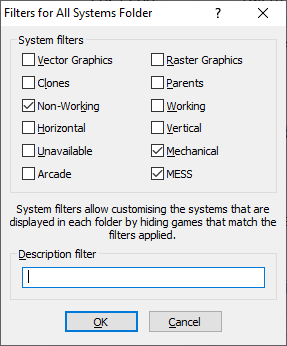
Here are my thoughts: - merging HBMAME with ARCADE is currently impossible since they use different MAME versions (HBMAME is using 0.245). Even if they did use the same MAME version, it's not recommended to merge them because it are 2 different worlds: officially released arcade games with a cabinet/conversion kit versus ROM hacks. - HBMAME compiled for ARM64 (I compile for Apple Silicon) is having some games to crash because it's based on old MAME 0.245 code which doesn't have ARM64 optimized code. It needs to be updated to modern MAME code - ARCADE is not offering something different then a specific filter applied to MAMEUI: exclude the non-working, mechanical and MESS games and you have the ARCADE game list. The user interface is not updated anymore and doesn't give anything that MAMEUI can't do. According to me it's a waste of time to maintain this frontend. See attached filter of MAMEUI to get ARCADE game list. My proposal: - keep HBMAME as a separate project but update it to a modern MAME version to make fully compatible ARM64 builds. The future is ARM64. - completely abandon ARCADE since you can get the ARCADE game list by applying filters in MAMEUI - keep updating MAMEUI but try to keep the source code as close to vanilla MAME
-
MAMEUI64 0.287.0 color status is different compared to vanilla MAME
mame-licious replied to mame-licious's topic in MameUI
That's why MAMEUI should be a UI layer on top of vanilla MAME and not changing it's code/behavior. I don't see the point to change MAME's behavior but thanks for informing me about this different thing. -
MAMEUI official website: Icons folder missing
mame-licious replied to mame-licious's topic in MameUI
Also the roms are present in the ARCADE package. -
MAMEUI official website: Icons folder missing
mame-licious replied to mame-licious's topic in MameUI
I tested on macOS using Wine and the screenshots I posted are from Windows 10. So MAMEUI is not behaving the same here. On both setups they are grey here. I only get yellow chips, all green ones are grey. I use your official binary so what can I do? -
I have no idea what your setup is. I get green chips and yellow chips. As far as I'm concerned, it works.
-

MAMEUI64 0.287.0 color status is different compared to vanilla MAME
Robert replied to mame-licious's topic in MameUI
MAME does that stuff differently. If there's an imperfect device, its status makes it's way down to the game - that doesn't happen in MAMEUI. Things I don't care about such as Protection, Timing, Microphone, LAN are not used by MAMEUI. So they will never be the same. I'm not planning on changing it. -
MAMEUI64 0.287.0 color status is different compared to vanilla MAME
mame-licious replied to mame-licious's topic in MameUI
Here the screenshots for "39in1" https://ibb.co/s98w6Ryd https://ibb.co/27H3tj1b -
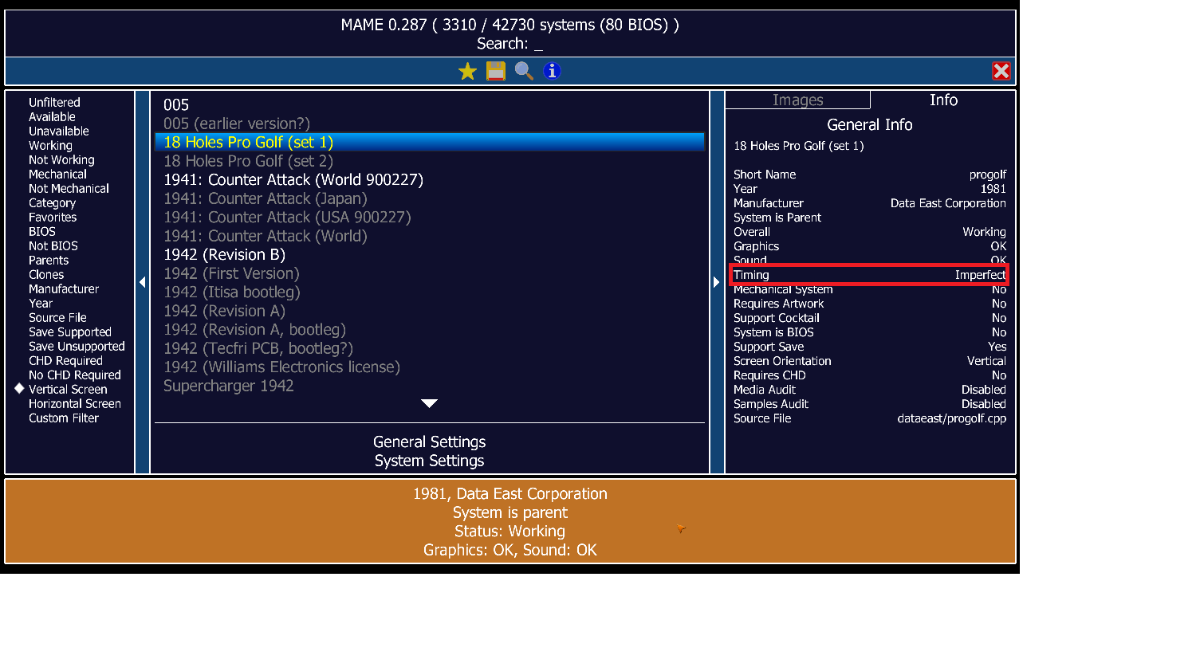
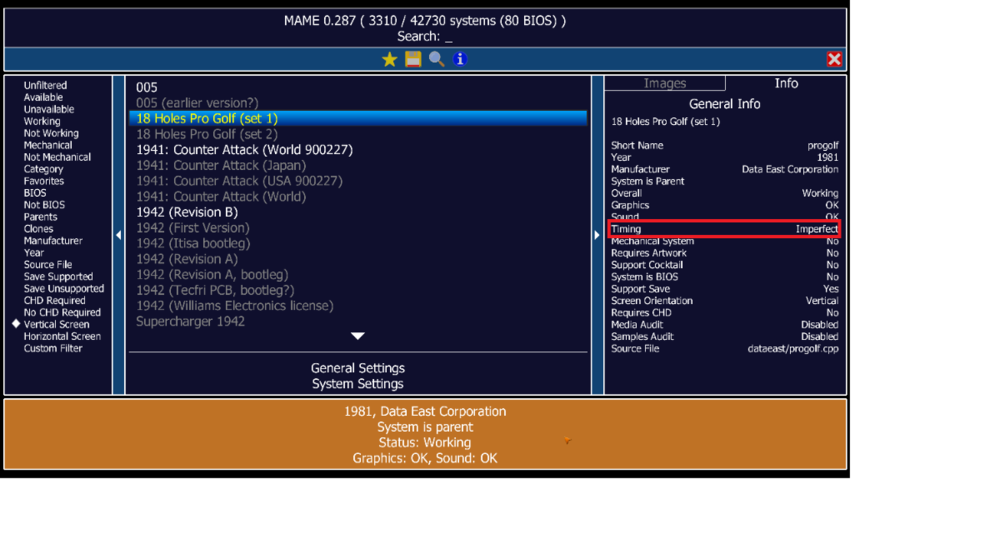
Hi When comparing MAMEUI64 0.287.0 versus MAME 0.287, the color status of some machines is different. Some screenshots of machines: - "progolf": this machine is orange in vanilla MAME because of imperfect timing. MAMEUI says it's green... - "39in1": here MAMEUI and vanilla MAME are both orange since MAMEUI correctly detects the sound is imperfect I hope it will be fixed in the next version.

-
MAMEUI official website: Icons folder missing
mame-licious replied to mame-licious's topic in MameUI
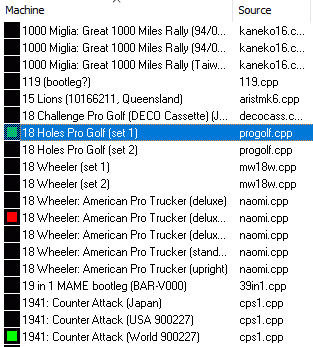
I also have no idea what you are talking about since the IC chip icons don't have any color depending on the status... Screenshot below to indicate the IC chip icons without colors vs. the icons that used to ship with MAMEUI which show the colors. If you don't have the Icons folder, you will never see any green icons (see 18 holes pro golf and 1941) I also opened a new thread for a bug in MAMEUI: the status of 18 holes pro golf is orange and not green in vanilla MAME, so MAMEUI tells another status (which is impossible since I compare the same MAME versions).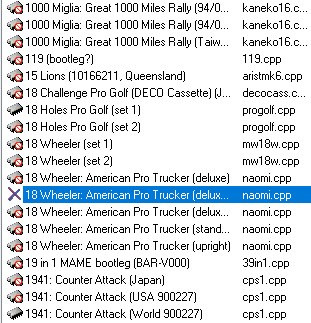
-
OK but it's a mystery for me why commits to open source projects are supposed to have secret meanings behind them I can only hope you also want to commit the changes to MAME itself! That's the only thing I wanted to say.
-
I don't mean to be rude, but none of that is any of your business.
-
I didn't know about the roms so I've modified my packaging script to not include them in future. But MAMEUI has default icons inbuilt, they mostly look like IC chips of different colours depending on the status, and a red X for not working sets. So I have no idea what you're on about.
-
Hi Robert I'm a bit confused here: you fix problems in games considering audio but you just commit these changes to the MAMEUI code and not to MAME? Or how do we need to understand it? If this is true, why not commit them to MAME? Isn't MAMEUI just a graphical user interface on top of MAME while all other code should be "vanilla" MAME? (this is not a negative comment at all, just trying to understand what's going on)
-
MAMEUI official website: Icons folder missing
mame-licious replied to mame-licious's topic in MameUI
exactly. That's what I wanted to show Robert! He's making it for new MAMEUI users very not-user friendly. Just run the program without the icons and do an audit... Also if a new user finds out the icons are needed, he doesn't even know what the file names are so he can't make the icons himself (unless you go search the source code of MAMEUI). And the funny thing is: there are 3 roms sets included in the 7zip but the icons are not. I hope Robert can add them so it's easy for everybody. According to me, they really are a part of MAMEUI because otherwise the audit feature is unusable. -
I remember to download them from the old MameUI place from John IV some years ago but yes, there is no place now for getting them unless you keep a copy in your drive from that time.