


mame-licious
-
Posts
62 -
Joined
-
Last visited
Content Type
Profiles
Events
Forums
Blogs
Downloads
Everything posted by mame-licious
-

MAMEUI official website: Icons folder missing
mame-licious replied to mame-licious's topic in MameUI
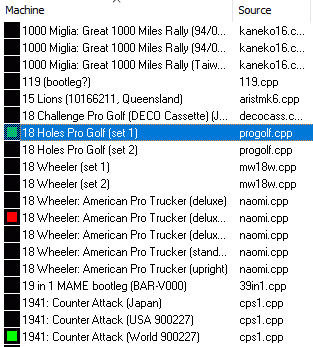
I also have no idea what you are talking about since the IC chip icons don't have any color depending on the status... Screenshot below to indicate the IC chip icons without colors vs. the icons that used to ship with MAMEUI which show the colors. If you don't have the Icons folder, you will never see any green icons (see 18 holes pro golf and 1941) I also opened a new thread for a bug in MAMEUI: the status of 18 holes pro golf is orange and not green in vanilla MAME, so MAMEUI tells another status (which is impossible since I compare the same MAME versions).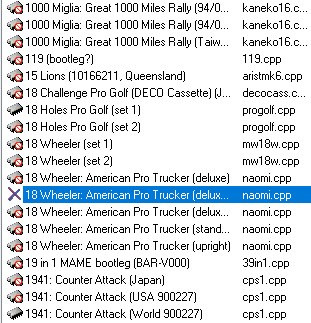
-
MAMEUI official website: Icons folder missing
mame-licious replied to mame-licious's topic in MameUI
exactly. That's what I wanted to show Robert! He's making it for new MAMEUI users very not-user friendly. Just run the program without the icons and do an audit... Also if a new user finds out the icons are needed, he doesn't even know what the file names are so he can't make the icons himself (unless you go search the source code of MAMEUI). And the funny thing is: there are 3 roms sets included in the 7zip but the icons are not. I hope Robert can add them so it's easy for everybody. According to me, they really are a part of MAMEUI because otherwise the audit feature is unusable. -
MAMEUI official website: Icons folder missing
mame-licious replied to mame-licious's topic in MameUI
I can understand this for MAME Resources but these icons are part of MAMEUI because they indicate the working status after doing an audit. I personally think it's strange files this tiny and required to see the audit result are not included I just saw on progettosnaps they are not included there too (I have them from many years ago). So where can the MAMEUI icons (just for the audit of the games), as of this writing, be downloaded? -
Hi On the official MAMEUI website, the Icons folder is missing in the 7zip. Could you please add this folder because it took me forever to find out why I don't have icons while I didn't expect the folder to be missing and I never checked it for that reason 😆 https://messui.1emulation.com/ Here they are from progettosnaps website Icons.zip
-
It seems something was wrong with the file, I copy pasted it to a new PNG file, saved it and now it's displayed correctly. So no bug :)
-
It seems this flyer is quite big in height. Does MAMEUI resize the image if it doesn't fit the resolution of the widget in case used on a small screen or will it fail to load in this case? I'm running here on a 14 inch MacBook but didn't test it on my big screen. So maybe that's the reason?
-
Did you already think about this request? It's extremely useful for searching a game inside a software list which can have several 1000s of games.
-
Thanks for the changes!
-
hi I,m updating my flyers archive and I found a very strange thing. For some reason the flyer for rom set "4dwarrio" doesn't want to display in the UI. The file opens correctly , is not damaged and is in a flyers folder assigned to MAMEUI and has name "4dwarrio.png". All my other flyers are displayed, just not this one :-S File below. Can you find out why it's not displayed in the UI and can you test if it works on your system (just put it in your flyers folder)? There must be something going on in MAMEUI because it doesn't want to display this PNG file. https://ibb.co/bgqMLwN0 https://ibb.co/N2VJxZd4
-
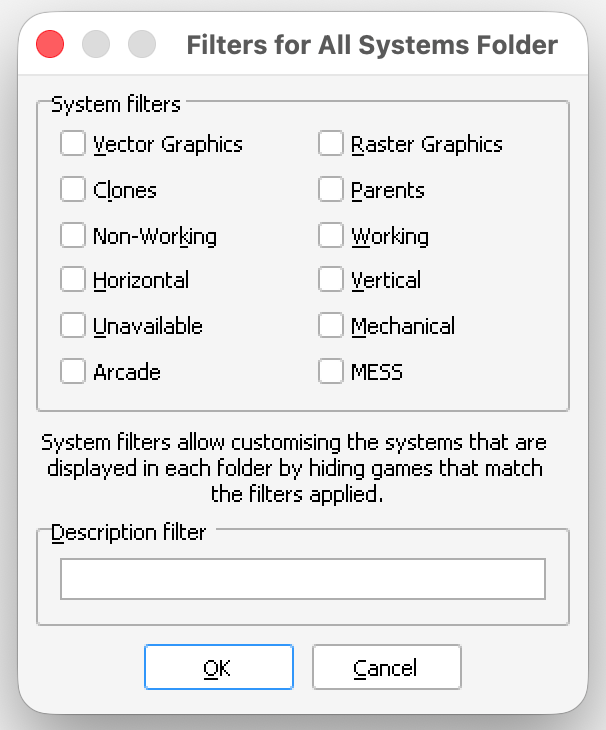
Hi I would like to request a new filter for the filters window in MAMEUI: "software list machines" filter. So this filter shows/hides all machines supporting 1 or more software lists. Users who don't use those machines at all can remove them with this filter. See behavior in IV Play, which has this filter in the F1 window: https://john-iv.github.io/iv-play/ It could be added to the filter window, see below
-
Yes it works! And for macOS too. But now i'm not sure if I'll have the "endurance" skills to keep compiling it again and again. I will see what I will do.
-
Hi My question was not if you are interested (because I do it myself), but if you added windows specific code to HBMAME (command line version) when you forked it from the official MAME repo. If you didn't do that, it should compile. So my question is just: do you remember adding windows specific code somewhere when making HBMAME (command line version)?
-
Thanks for the answer in private message :)
-
Hi I want to compile HBMAME (command line version) for Linux and macOS and distribute it on a new website i'm making. However, I don't know if you added windows specific code to the command line version of HBMAME so it won't compile on UNIX? https://hbmame.1emulation.com/
-
Is it possible to provide compile instructions for HBMAME (no UI) for macOS? Could you also write on your website the compile instructions for windows xp?
-
Hi Would you be interested in adding a search textbox for the SW Items ? It would be a VERY useful feature. Right now, there is no way to search the SW Items, while there can be thousands of them. You can just add a new search textbox in the SW Items tab and clone the existing behavior of the search textbox for the machines list and apply it to the SW Items list's textbox. https://ibb.co/YTWXmTy4
-
Does this also mean the MAMEUI executable is a debug EXE (and not a release EXE)?
-
Hi There is a big file called mameui.sym included with MAMEUI. What is this file for? If I delete it, everything seems to work.
-
Hi Would it be possible to make MAMEUI even more user friendly by changing some small dialog window properties? I'm thinking of: - putting the dialog windows in "Options" menu to the center of the screen. It's easier if all windows appear in the center of the screen. Also the "properties", "properties for drivername.cpp" and "add to custom folder" windows if you right click a game. And finally "View" -> "Custom filters" and "View" -> "Customize fields" windows. I don't know if MAMEUI uses Win32 API or MFC but Google AI gave this example implementation for Win32 API and it seems very easy. https://ibb.co/14Gy3mL https://ibb.co/Tq13WpMC - making the "add to custom folder" window (right click a game) much bigger when it's displayed (or certainly resizable by the user, if this is possible) since it's way too small to work with INI files with long file names and a lot of filter groups inside and can't be resized by the user. See screenshot https://ibb.co/PvrkW1Hk - adding a messagebox that appears after clicking "delete game settings" and "reset play stats" (right click a game): "game settings of game X deleted" and "play stats of game X reset". Right now there is no feedback to the user and this is a bit weird. Thanks in advance!
-
Hi Would it be possible to add a feature in the "Show Folders" menu (when right clicking the treeview at the left), called "User folders" with a checkbox (just like all other items in the menu). It can be enable/disabled to show/hide. This is the menu: https://ibb.co/FLfxrHqT This feature shows or hides all INI files the user has copied to "folders" folder of MAMEUI. So it just runs the existing code to displays all the INI files and shows or hides it in the treeview, depending on the checkbox. This would give me 2 advantages over the current version: I can hide all INI files without having to remove them from my "folders" folder and close/open MAMEUI again I can quickly test new INI files I made and see if they are loaded in MAMEUI without closing/opening the program each time (since the new feature just runs the INI file reading code when you enable it) Thanks for thinking about this!
-
Hi Would it be possible to add either add one of the 2 clone features? a feature to select the clone color for the game list if this is not possible: a feature to set parents to bold font and clones to normal font (both using the same font you choose in options -> system list font) Thanks in advance
-
MAMElicious - Home of MAME's INI Files
mame-licious replied to mame-licious's topic in Arcade Emulators [/pc/arcade]
MAME DAT files are now also provided. -
Great!
-
In history.xml you can find the correct history of a game. For Mortal Kombat, we can find the "original" game is: Mortal Kombat (rev 1.0 08/09/92) (Midway 1992) [ROM set: mkla1] It is NOT the parent which is called "original" in MAMEUI PROTO 4.0 (July 14, 1992): * Prototype version. * You cannot play as the same character. * Menu won't allow cursors to pass each other in 2-player selection. * Sub-Zero has new corner infinite (ex. uppercut, freeze and repeat) * Sub-Zero has faster recovery after slide and can go straight into sweep for most instances * Sub-Zero can freeze opponent in air for 'Finish Him/Her' as he's falling from uppercut, and do fatality in air and body will fall to ground frozen * Liu Kang can do Flying Kick when you do a HK first in air than F, F HK * Raiden can now do Torpedo after doing a jumping kick for more combo possibilities PROTO 8.0 (July 21, 1992): * Prototype version. PROTO 9.0 (July 28, 1992): * Prototype version. REV. 1.0 (August 9, 1992): * First official release of Mortal Kombat. * In a 2-player game, both players could not choose the same character. * Liu Kang had Uppercut - Flying Kick Combo. REV. 2.0 (August 9, 1992): * Both players could choose the same character. * New Shang Tsung death animation added. * Merchandise promo added. * More blood added. REV. 3.0 (August 31, 1992): * Computer intelligence increased. * Reptile added. * Comic book offer is a switch setting. REV. 4.0 (September 28, 1992): * Reptile clues added (shadows on moon, see Tips and Tricks section). * Sonya and Kano could fight Reptile. * Block allowed during fatality. * Goro's theme played during all Endurance rounds. REV. 4.0 [T-Unit] (February 11, 1993): * Runs on the newer Midway T Unit hardware, the same hardware as Mortal Kombat II REV. 5.0 [T-Unit] (March 19, 1993): * Bug fix release.
-
Using "Original" is actually wrong since a parent is not always the first game released (in a parent/clone relation). There is no historical meaning at all in a parent/clone relation, only an implementation meaning as the machine with the most common code is indicated as parent. As a consequence chooseing "original" instead of "parent" is a wrong word. See below for an example: you can see a machine release in 1993 is the parent, but wrongly called "original". That's why the word "parent" is the right decision (as MAME always uses). https://ibb.co/23xSbZqb