
mame-licious
-
Posts
62 -
Joined
-
Last visited
Content Type
Profiles
Events
Forums
Blogs
Downloads
Everything posted by mame-licious
-

question: icons supported colors & transparency
mame-licious replied to mame-licious's topic in MameUI
- Please answer my question, otherwise this thread is useful. This is the 2nd time you ignore a question (in another thread too my question about software list machines) - I don't create duplicate threads! This forum is so slow that when I post something, my browser is loading more then a minute, I get "gateway timeout" and then the SAME thread is posted twice. So I can't possibly be helt responsible for the slowness of this forum and the responding browser who sends the request one more time... Thanks :) -
question: icons supported colors & transparency
mame-licious replied to mame-licious's topic in MameUI
And when going from custom made icons to the built-in ones (by removing the icons path in the settings) and restarting the app, suddenly the chips have a white background too! Any idea what's causing this and how to solve it? It must remember something since the icons path is completely REMOVED and the built-in icons have a transparent background See https://ibb.co/LzGZ35S4 -
MAMEUI request: parent/clone universal icon color
mame-licious replied to mame-licious's topic in MameUI
Hmm what do you mean? And to which question is this an answer? Yes they can: if you put in the "icons" folder icons with names "imperfect.ico", "roms.ico" and "warning.ico". Those override the chip icons then. So my question was: after this new update, will this behavior still be working or when are the icons, as written above, used in case of the 3-state checkbox? It's not clear at all because you only talk about the driver icons (romsetname.ico) and not about these. So which icons (the above) or the driver icons gets precedence over each other and this for each of the 3-states that are introduced now? -
Hi I know the MAMEUI code is old but I was wondering if you can tell me the icon's number of supported colors (like 256, ...) and if transparent background of the icon is supported. Do you maybe know this or can you find it in the widget API that is used? I'm making some icons and for now I can't make a transparent background appear. It displays as white. See https://ibb.co/vvcrVxrY
-
MAMEUI request: parent/clone universal icon color
mame-licious replied to mame-licious's topic in MameUI
After this update, will the icons as seen here in attachment will still be working? -
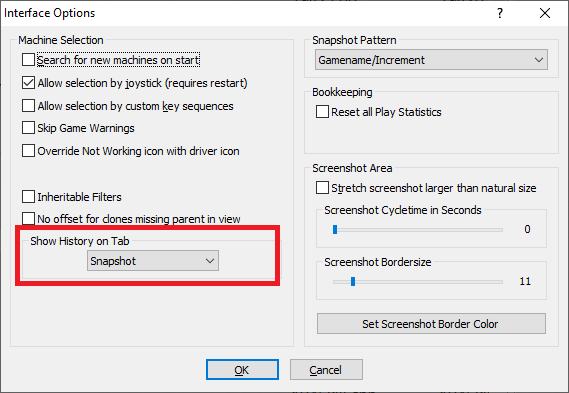
hi Please look at screenshot, indicated feature. No matter what tab you choose, the history.xml text is still displayed on it's own "history" tab. So no matter what you choose, nothing happens. Is this a bug or a feature that's not working anymore and should be removed? What should (or did) it do?
-
MAMEUI request: parent/clone universal icon color
mame-licious replied to mame-licious's topic in MameUI
I live in Apple world and until now I never seen any checkbox with 3 states. It's maybe existing too but I didn't see it anywhere. What about my question about software list machines? -
MAMEUI request: parent/clone universal icon color
mame-licious replied to mame-licious's topic in MameUI
Since you are changing the icons, I had another idea. What about making a different icon for machines that support software lists? Right now, we have no way to filter the software list machines and also no way to visually see them in the list. So there are now grey icons with ? and the stop sign. Could you make green/yellow chips with another thing (like the ? and the stop sign) that indicates the machines supports software lists? I don't know what would be best but maybe a small floppy disk? (or something else) Maybe it's not really visible very well. Or maybe you could make a new field "supports software lists" here? ("yes"/"no" depending if the machine supports software lists or not) Just asking your opinion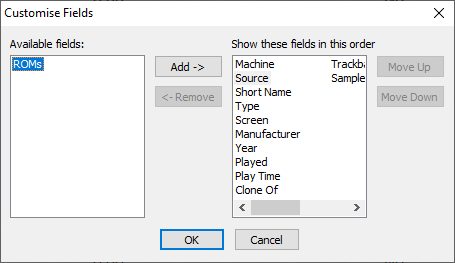
-
MAMEUI request: parent/clone universal icon color
mame-licious replied to mame-licious's topic in MameUI
Hi! First, it's great working with you since you actively listen to users and implement changes! I just love the new icons approach. I have several questions here: - how can a checkbox have 3 states? I never used/saw it and according to me you can only check/uncheck it. So I need explanation in order to understand the next release How to enable the intermediate state of a checkbox? I think not many people know a 3-state checkbox, so you are creating confusion here, just by using it. Are you interested to replace it with 3 radiobuttons (one for each state, and of course 1 can be enabled, the other 2 get disabled automatically)? According to me much better and no confusion. - what do you mean by "driver" icons? I only know about the icons (green/red/yellow, see issue about missing icons) that were shipped with John IV's version of MAMEUI. Are those the driver icons? I need to know this in order to test the next release You are writing a lot of new information now and I can imagine users don't know how it all works. I will need to save the information too since I won't remember it all. Once John IV's version of MAMEUI had a CHM file included (see link). Would you be interested to update this file with this new information and include it with MAMEUI ? Where else can we find a sort of "manual" for MAMEUI?You could also update the "Art & Support Files" there with all the supported DAT files (since it's not up to date anymore) and remove some information like "Game changes" and "MAMEUI Changes" Is there a way to make tooltips appear when you go with the mouse over widgets? In that way you can write explanation for the new checkbox. https://limewire.com/d/UWkgJ#kEI9aro93I -
Sorry, this forum is so slow, my browser keeps loading forever and this post was added twice ...
-
Hi The support for HBMAME on progettosnaps is close to dead and there is no update in years. See https://www.progettosnaps.net/snapshots/othersets.php Since you maintain HBMAME and test the newly added games, would it be possible that you provide us with a snaps pack (only in-game gameplay screenshot) for HBMAME on the official HBMAME's website? You could add the newly added games (when you test them, you can make a screenshot at the same time) and slowly add the older ones.
-
MAMEUI feature request: more font & color settings
mame-licious replied to mame-licious's topic in MameUI
To clarify a bit, I'm interested in following changes with 1 -> 3 interest priority. And if all approved by you, I like them all 1 font & color for everything is according to me a bit too limited in mameui. So these changes could make the UI better: 1) a separate font & color for the history.xml text (and all DAT files on the same tabpage) 2) a separate font & color for the folders list (treeview) at the left 3) a choice background image (already existing now) OR background color for everything above and the game list -
MAMEUI official website: Icons folder missing
mame-licious replied to mame-licious's topic in MameUI
Solved in the other issue -
MAMEUI request: parent/clone universal icon color
mame-licious replied to mame-licious's topic in MameUI
Thanks so much! This is perfect and exactly the change I wanted. Now all confusion is gone, especially for beginning users. -
MAMEUI request: parent/clone universal icon color
mame-licious replied to mame-licious's topic in MameUI
I looked at how ARCADE is doing it and there working parents are green chips. And even more, I like the way the icon chip colors are used in ARCADE more and I would like to ask if you want to apply the icon colors of ARCADE to MAMEUI because they are much better and intuitive for beginners too. ARCADE: - working parent: green chip (example "wboy") / working clone: lighter green chip (example "wboy2") - not working parent or clone: red chip (example "wheelfir") - partially working parent or clone: yellow chip (example "wow") - missing roms for parent or clone: grey chip (example "warlords") Why is this better then current MAMEUI icons? You can immediately see working (green), partially working (yellow) or not working (red) while missing roms are grey chips. MAMEUI is displaying grey for working parents and a red cross for not working parents/clones. The grey chip for working parents can create a lot of confusion and the red cross for not working parents/clones could better be replaced by a red chip (since the green and yellow chips also are complemented logically with a red chip for not working games) It's more consistent and intuitive if the chips are used for ALL green/yellow/red status. And in addition grey chips should be used for MISSING roms (grey is now used for working parents in MAMEUI which is totally not-intuitive !!!).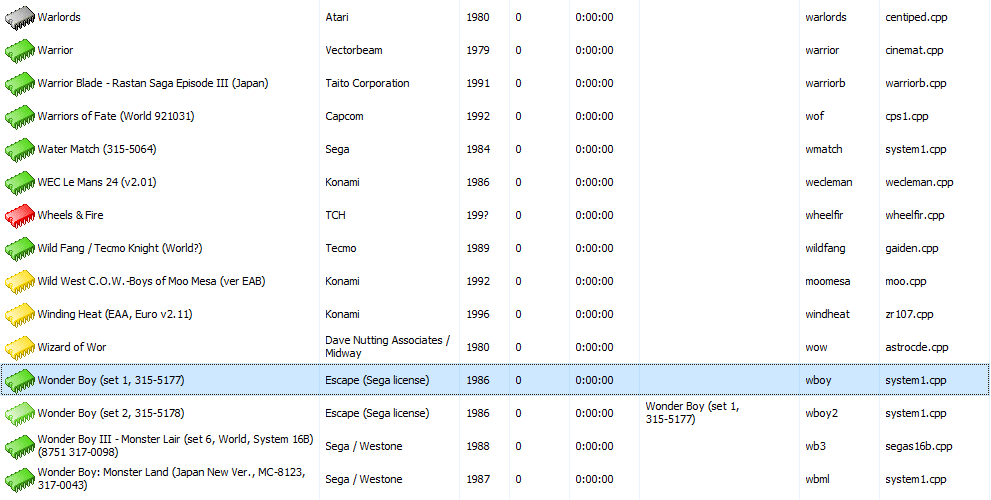
-
MAMEUI request: parent/clone universal icon color
mame-licious replied to mame-licious's topic in MameUI
You can see the yellow color for parents is working, because if you look at the screenshot, there are 4 games displayed yellow and they are all parent machines. So if you apply my request, chips having grey color will be completely eliminated from the games list because: - parents can already have yellow color chips (this behavior is already correct right now) - parents that WERE grey will be converted to green (if you apply my request) and this eliminates grey color chips completely This makes the game list have universal yellow/green colors for parents and clones and this is according to me the best to display them. I hope you can apply this change -
Hi For some reason the chip color for a working parent is grey but the chip color of a working clone of this parent is green. I don't know if this is a bug, but it's applied everywhere for each parent/clone available. A parent, for this reason, can NEVER have a green chip color. According to me there is no need to have a color difference between a working parent or its working clones. It makes sense to display them all green, no matter if it's a parent or clone. Would you be interested to change working parent icon's color to green, the same as their clones? It's very confusing the way it works now (the proof is that I was confused about this for days until I found out this specific behavior in MAMEUI) Below a screenshot of the latest MAMEUI version: - wboy is a parent, working, but grey color - wboy2 is a clone of wboy, working, and green color

-
MAMEUI official website: Icons folder missing
mame-licious replied to mame-licious's topic in MameUI
I finally found what's going on: for some reason parents have grey chips and clones have green chips (if the status is working). Can you confirm this is the intended behavior? I opened a request to change this behavior slightly. See: https://www.1emulation.com/forums/topic/37896-mameui-request-parentclone-universal-icon-color/ -
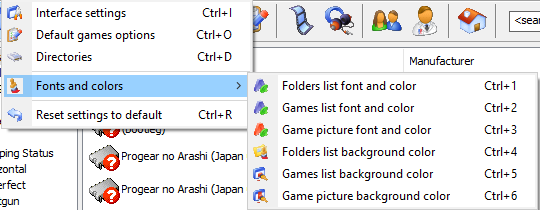
Hi One thing that's better in ARCADE are the more font & color settings possible. MAMEUI just uses 1 font & color for everything. It's too limited anno 2026. Would you be interested to port the existing settings in ARCADE to MAMEUI? In MAMEUI choosing a background image will override all these background colors. Also a history.xml font & color is highly recommended.
-
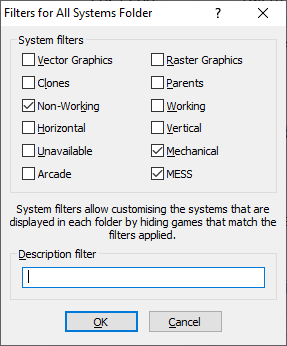
Here are my thoughts: - merging HBMAME with ARCADE is currently impossible since they use different MAME versions (HBMAME is using 0.245). Even if they did use the same MAME version, it's not recommended to merge them because it are 2 different worlds: officially released arcade games with a cabinet/conversion kit versus ROM hacks. - HBMAME compiled for ARM64 (I compile for Apple Silicon) is having some games to crash because it's based on old MAME 0.245 code which doesn't have ARM64 optimized code. It needs to be updated to modern MAME code - ARCADE is not offering something different then a specific filter applied to MAMEUI: exclude the non-working, mechanical and MESS games and you have the ARCADE game list. The user interface is not updated anymore and doesn't give anything that MAMEUI can't do. According to me it's a waste of time to maintain this frontend. See attached filter of MAMEUI to get ARCADE game list. My proposal: - keep HBMAME as a separate project but update it to a modern MAME version to make fully compatible ARM64 builds. The future is ARM64. - completely abandon ARCADE since you can get the ARCADE game list by applying filters in MAMEUI - keep updating MAMEUI but try to keep the source code as close to vanilla MAME
-
MAMEUI64 0.287.0 color status is different compared to vanilla MAME
mame-licious replied to mame-licious's topic in MameUI
That's why MAMEUI should be a UI layer on top of vanilla MAME and not changing it's code/behavior. I don't see the point to change MAME's behavior but thanks for informing me about this different thing. -
MAMEUI official website: Icons folder missing
mame-licious replied to mame-licious's topic in MameUI
Also the roms are present in the ARCADE package. -
MAMEUI official website: Icons folder missing
mame-licious replied to mame-licious's topic in MameUI
I tested on macOS using Wine and the screenshots I posted are from Windows 10. So MAMEUI is not behaving the same here. On both setups they are grey here. I only get yellow chips, all green ones are grey. I use your official binary so what can I do? -
MAMEUI64 0.287.0 color status is different compared to vanilla MAME
mame-licious replied to mame-licious's topic in MameUI
Here the screenshots for "39in1" https://ibb.co/s98w6Ryd https://ibb.co/27H3tj1b -
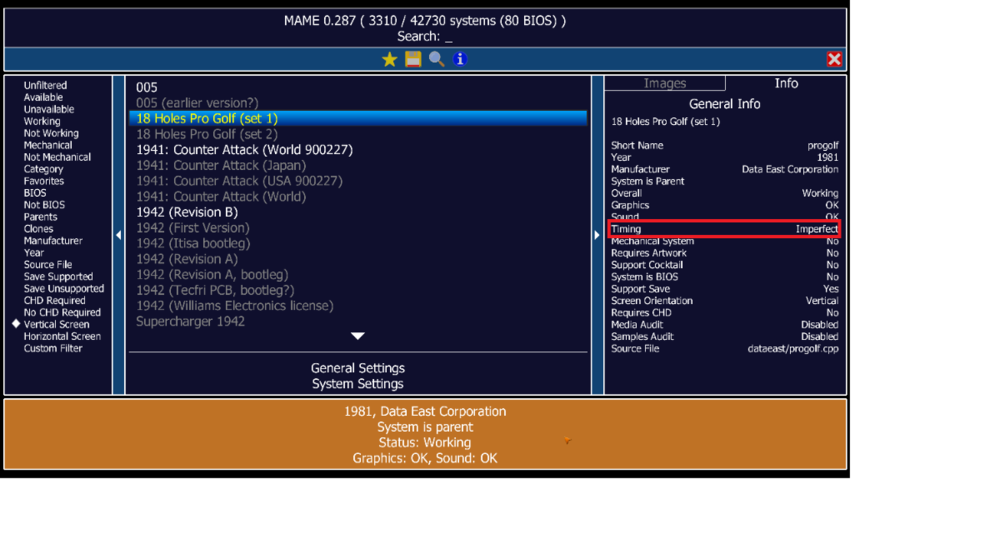
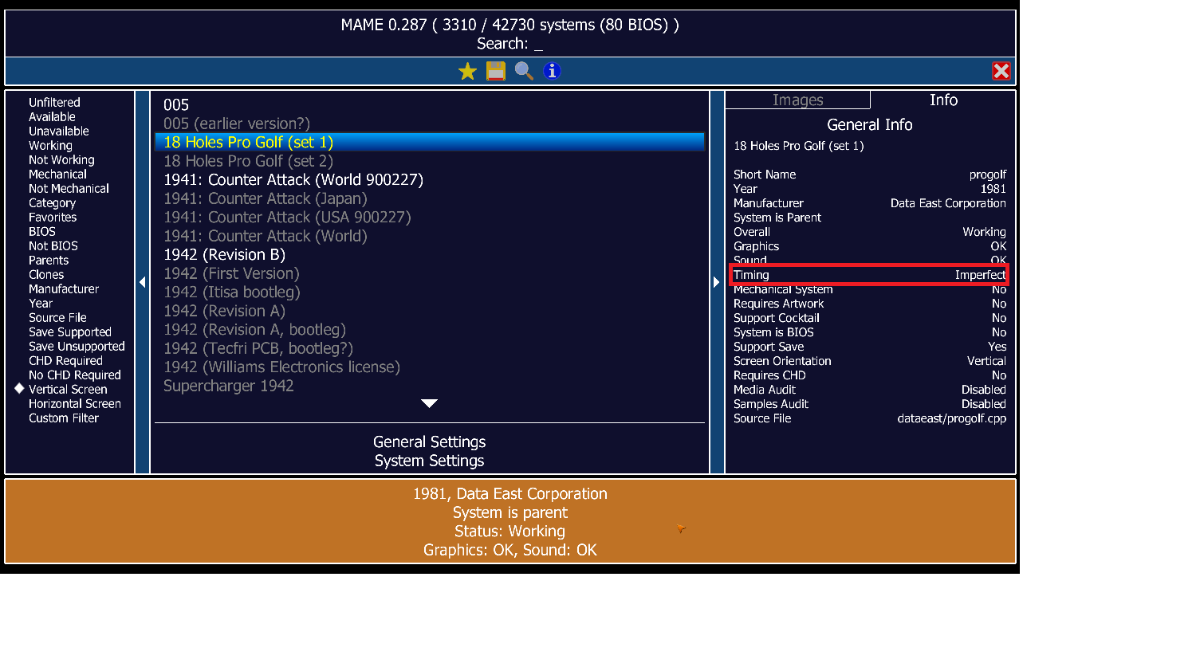
Hi When comparing MAMEUI64 0.287.0 versus MAME 0.287, the color status of some machines is different. Some screenshots of machines: - "progolf": this machine is orange in vanilla MAME because of imperfect timing. MAMEUI says it's green... - "39in1": here MAMEUI and vanilla MAME are both orange since MAMEUI correctly detects the sound is imperfect I hope it will be fixed in the next version.