All Activity
- Yesterday
-

MAMEUI request: parent/clone universal icon color
mame-licious replied to mame-licious's topic in MameUI
I looked at how ARCADE is doing it and there working parents are green chips. And even more, I like the way the icon chip colors are used in ARCADE more and I would like to ask if you want to apply the icon colors of ARCADE to MAMEUI because they are much better and intuitive for beginners too. ARCADE: - working parent: green chip (example "wboy") / working clone: lighter green chip (example "wboy2") - not working parent or clone: red chip (example "wheelfir") - partially working parent or clone: yellow chip (example "wow") - missing roms for parent or clone: grey chip (example "warlords") Why is this better then current MAMEUI icons? You can immediately see working (green), partially working (yellow) or not working (red) while missing roms are grey chips. MAMEUI is displaying grey for working parents and a red cross for not working parents/clones. The grey chip for working parents can create a lot of confusion and the red cross for not working parents/clones could better be replaced by a red chip (since the green and yellow chips also are complemented logically with a red chip for not working games) It's more consistent and intuitive if the chips are used for ALL green/yellow/red status. And in addition grey chips should be used for MISSING roms (grey is now used for working parents in MAMEUI which is totally not-intuitive !!!).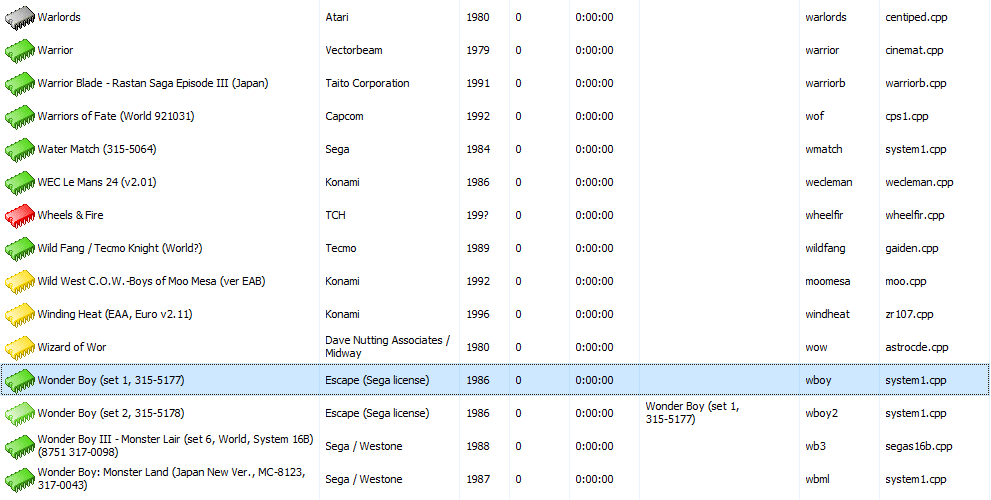
-
MAMEUI request: parent/clone universal icon color
mame-licious replied to mame-licious's topic in MameUI
You can see the yellow color for parents is working, because if you look at the screenshot, there are 4 games displayed yellow and they are all parent machines. So if you apply my request, chips having grey color will be completely eliminated from the games list because: - parents can already have yellow color chips (this behavior is already correct right now) - parents that WERE grey will be converted to green (if you apply my request) and this eliminates grey color chips completely This makes the game list have universal yellow/green colors for parents and clones and this is according to me the best to display them. I hope you can apply this change -
Hi For some reason the chip color for a working parent is grey but the chip color of a working clone of this parent is green. I don't know if this is a bug, but it's applied everywhere for each parent/clone available. A parent, for this reason, can NEVER have a green chip color. According to me there is no need to have a color difference between a working parent or its working clones. It makes sense to display them all green, no matter if it's a parent or clone. Would you be interested to change working parent icon's color to green, the same as their clones? It's very confusing the way it works now (the proof is that I was confused about this for days until I found out this specific behavior in MAMEUI) Below a screenshot of the latest MAMEUI version: - wboy is a parent, working, but grey color - wboy2 is a clone of wboy, working, and green color

-
MAMEUI official website: Icons folder missing
mame-licious replied to mame-licious's topic in MameUI
I finally found what's going on: for some reason parents have grey chips and clones have green chips (if the status is working). Can you confirm this is the intended behavior? I opened a request to change this behavior slightly. See: https://www.1emulation.com/forums/topic/37896-mameui-request-parentclone-universal-icon-color/ - Last week
-
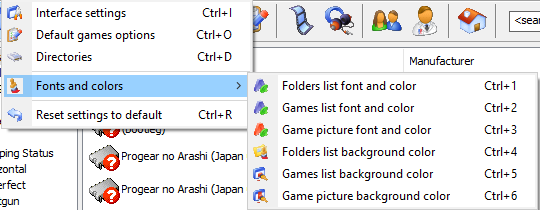
Hi One thing that's better in ARCADE are the more font & color settings possible. MAMEUI just uses 1 font & color for everything. It's too limited anno 2026. Would you be interested to port the existing settings in ARCADE to MAMEUI? In MAMEUI choosing a background image will override all these background colors. Also a history.xml font & color is highly recommended.
-
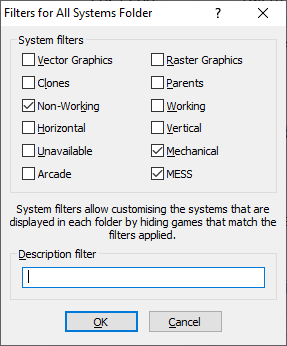
Here are my thoughts: - merging HBMAME with ARCADE is currently impossible since they use different MAME versions (HBMAME is using 0.245). Even if they did use the same MAME version, it's not recommended to merge them because it are 2 different worlds: officially released arcade games with a cabinet/conversion kit versus ROM hacks. - HBMAME compiled for ARM64 (I compile for Apple Silicon) is having some games to crash because it's based on old MAME 0.245 code which doesn't have ARM64 optimized code. It needs to be updated to modern MAME code - ARCADE is not offering something different then a specific filter applied to MAMEUI: exclude the non-working, mechanical and MESS games and you have the ARCADE game list. The user interface is not updated anymore and doesn't give anything that MAMEUI can't do. According to me it's a waste of time to maintain this frontend. See attached filter of MAMEUI to get ARCADE game list. My proposal: - keep HBMAME as a separate project but update it to a modern MAME version to make fully compatible ARM64 builds. The future is ARM64. - completely abandon ARCADE since you can get the ARCADE game list by applying filters in MAMEUI - keep updating MAMEUI but try to keep the source code as close to vanilla MAME
-
MAMEUI64 0.287.0 color status is different compared to vanilla MAME
mame-licious replied to mame-licious's topic in MameUI
That's why MAMEUI should be a UI layer on top of vanilla MAME and not changing it's code/behavior. I don't see the point to change MAME's behavior but thanks for informing me about this different thing. -
MAMEUI official website: Icons folder missing
mame-licious replied to mame-licious's topic in MameUI
Also the roms are present in the ARCADE package. -
MAMEUI official website: Icons folder missing
mame-licious replied to mame-licious's topic in MameUI
I tested on macOS using Wine and the screenshots I posted are from Windows 10. So MAMEUI is not behaving the same here. On both setups they are grey here. I only get yellow chips, all green ones are grey. I use your official binary so what can I do? -
I have no idea what your setup is. I get green chips and yellow chips. As far as I'm concerned, it works.
-

MAMEUI64 0.287.0 color status is different compared to vanilla MAME
Robert replied to mame-licious's topic in MameUI
MAME does that stuff differently. If there's an imperfect device, its status makes it's way down to the game - that doesn't happen in MAMEUI. Things I don't care about such as Protection, Timing, Microphone, LAN are not used by MAMEUI. So they will never be the same. I'm not planning on changing it. -
MAMEUI64 0.287.0 color status is different compared to vanilla MAME
mame-licious replied to mame-licious's topic in MameUI
Here the screenshots for "39in1" https://ibb.co/s98w6Ryd https://ibb.co/27H3tj1b -
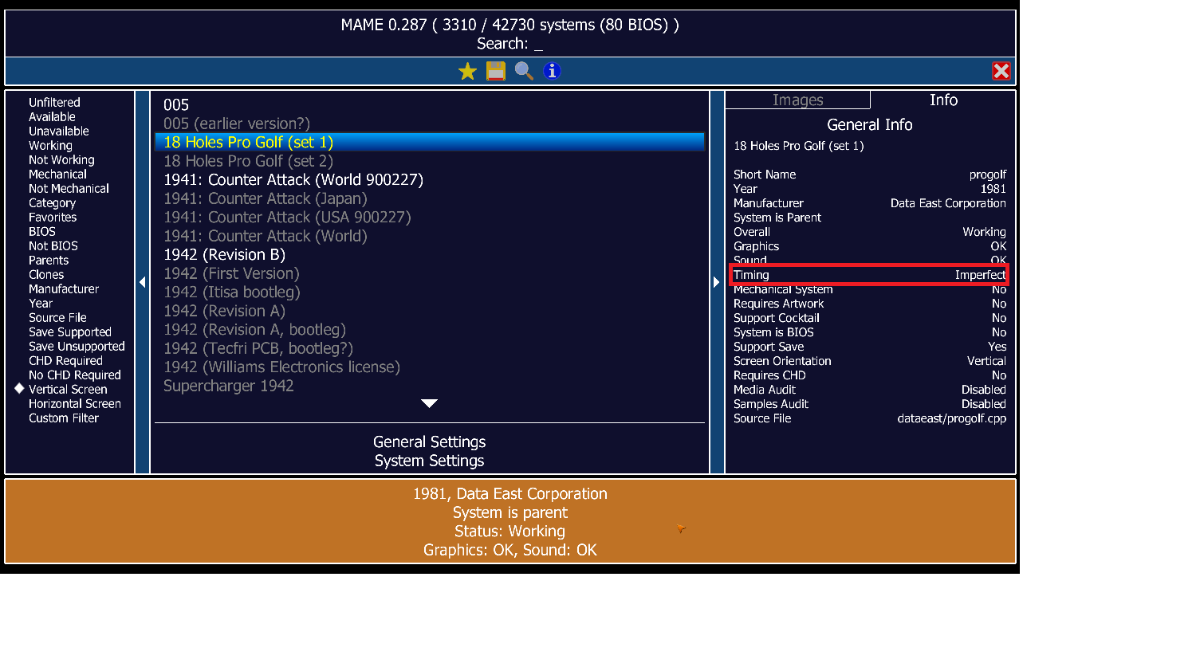
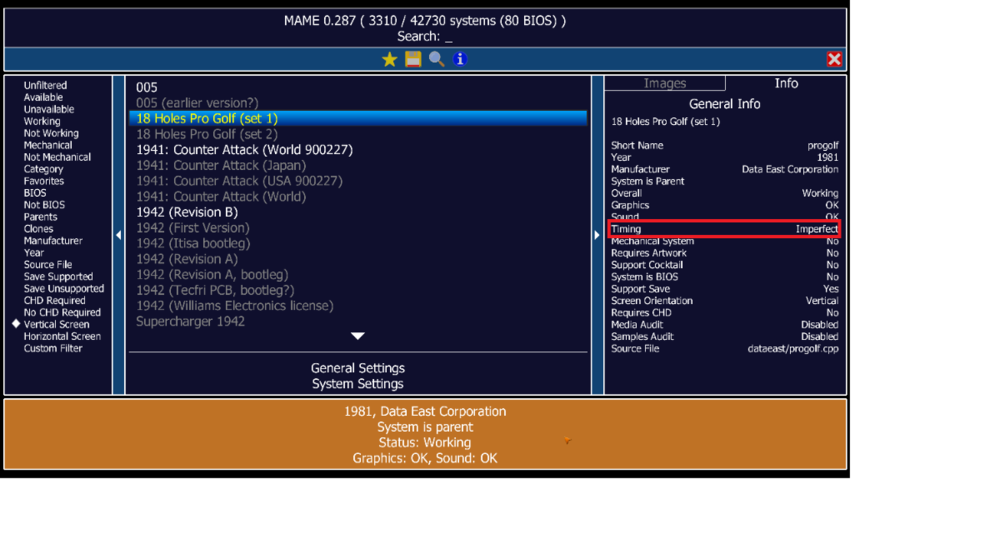
Hi When comparing MAMEUI64 0.287.0 versus MAME 0.287, the color status of some machines is different. Some screenshots of machines: - "progolf": this machine is orange in vanilla MAME because of imperfect timing. MAMEUI says it's green... - "39in1": here MAMEUI and vanilla MAME are both orange since MAMEUI correctly detects the sound is imperfect I hope it will be fixed in the next version.

-
MAMEUI official website: Icons folder missing
mame-licious replied to mame-licious's topic in MameUI
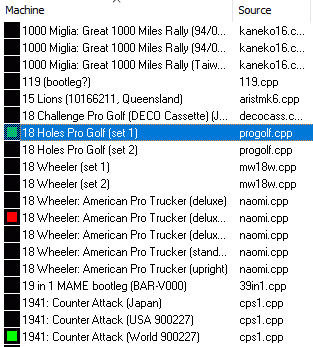
I also have no idea what you are talking about since the IC chip icons don't have any color depending on the status... Screenshot below to indicate the IC chip icons without colors vs. the icons that used to ship with MAMEUI which show the colors. If you don't have the Icons folder, you will never see any green icons (see 18 holes pro golf and 1941) I also opened a new thread for a bug in MAMEUI: the status of 18 holes pro golf is orange and not green in vanilla MAME, so MAMEUI tells another status (which is impossible since I compare the same MAME versions).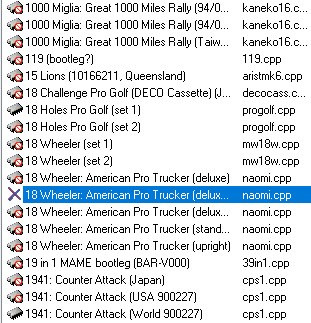
-
OK but it's a mystery for me why commits to open source projects are supposed to have secret meanings behind them I can only hope you also want to commit the changes to MAME itself! That's the only thing I wanted to say.
-
I don't mean to be rude, but none of that is any of your business.
-
I didn't know about the roms so I've modified my packaging script to not include them in future. But MAMEUI has default icons inbuilt, they mostly look like IC chips of different colours depending on the status, and a red X for not working sets. So I have no idea what you're on about.
-
Hi Robert I'm a bit confused here: you fix problems in games considering audio but you just commit these changes to the MAMEUI code and not to MAME? Or how do we need to understand it? If this is true, why not commit them to MAME? Isn't MAMEUI just a graphical user interface on top of MAME while all other code should be "vanilla" MAME? (this is not a negative comment at all, just trying to understand what's going on)
-
MAMEUI official website: Icons folder missing
mame-licious replied to mame-licious's topic in MameUI
exactly. That's what I wanted to show Robert! He's making it for new MAMEUI users very not-user friendly. Just run the program without the icons and do an audit... Also if a new user finds out the icons are needed, he doesn't even know what the file names are so he can't make the icons himself (unless you go search the source code of MAMEUI). And the funny thing is: there are 3 roms sets included in the 7zip but the icons are not. I hope Robert can add them so it's easy for everybody. According to me, they really are a part of MAMEUI because otherwise the audit feature is unusable. -
I remember to download them from the old MameUI place from John IV some years ago but yes, there is no place now for getting them unless you keep a copy in your drive from that time.
-
MAMEUI official website: Icons folder missing
mame-licious replied to mame-licious's topic in MameUI
I can understand this for MAME Resources but these icons are part of MAMEUI because they indicate the working status after doing an audit. I personally think it's strange files this tiny and required to see the audit result are not included I just saw on progettosnaps they are not included there too (I have them from many years ago). So where can the MAMEUI icons (just for the audit of the games), as of this writing, be downloaded? -
We only supply the absolute minimum, things that can't be obtained elsewhere. Icons, snaps and other non-essential things have to be sourced by the user, from wherever they can be found.
-
Hi On the official MAMEUI website, the Icons folder is missing in the 7zip. Could you please add this folder because it took me forever to find out why I don't have icons while I didn't expect the folder to be missing and I never checked it for that reason 😆 https://messui.1emulation.com/ Here they are from progettosnaps website Icons.zip
-
It seems something was wrong with the file, I copy pasted it to a new PNG file, saved it and now it's displayed correctly. So no bug :)
-
It seems this flyer is quite big in height. Does MAMEUI resize the image if it doesn't fit the resolution of the widget in case used on a small screen or will it fail to load in this case? I'm running here on a 14 inch MacBook but didn't test it on my big screen. So maybe that's the reason?