All Activity
- Past hour
-

MAMEUI request: parent/clone universal icon color
mame-licious replied to mame-licious's topic in MameUI
Hmm what do you mean? And to which question is this an answer? -
Hi I know the MAMEUI code is old but I was wondering if you can tell me the icon's supported colors and if transparent background of the icon is supported. Do you maybe know this or can you find it in the widget API that is used? I'm making some icons and for now I can't make a transparent background appear. It displays as white. See https://ibb.co/tMsG5mz5
-
Hi I know the MAMEUI code is old but I was wondering if you can tell me the icon'd supported colors and if transparent background of the icon is supported. Do you maybe know this or can you find it in the widget API that is used? I'm making some icons and for now I can't make a transparent background appear. It displays as white. See https://ibb.co/tMsG5mz5
-
The chip icons and the red X are built into the app and cannot disappear.
-
MAMEUI request: parent/clone universal icon color
mame-licious replied to mame-licious's topic in MameUI
After this update, will the icons as seen here in attachment will still be working? - Today
-

bug: MAMEUI64 0.287.0: show history on tab not working
Robert replied to mame-licious's topic in MameUI
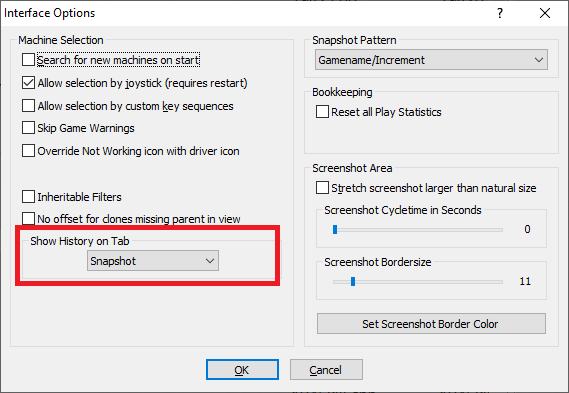
It works, but you have to turn off the History tab. You can't have history displaying on 2 tabs at the same time.- 1 reply
-
- 1
-

-
hi Please look at screenshot, indicated feature. No matter what tab you choose, the history.xml text is still displayed on it's own "history" tab. So no matter what you choose, nothing happens. Is this a bug or a feature that's not working anymore and should be removed? What should (or did) it do?
- Yesterday
-
is possible to have 4/3 version instead of widescreen?
-
ok works even on stock xbox
-
MAMEUI request: parent/clone universal icon color
mame-licious replied to mame-licious's topic in MameUI
I live in Apple world and until now I never seen any checkbox with 3 states. It's maybe existing too but I didn't see it anywhere. What about my question about software list machines? -
CHM files are a lot of work and microsoft considers them as a security risk, so no. Don't have the time to deal with it. 3-state checkboxes have been around for ages. To see one in action, right-click on a folder and look at the properties. Click on the "Read-only" checkbox and you can see it goes through 3 different states. There's no need for me to explain how they work, everyone knows. Driver icons are a specific icon per game. You can get them from the usual places. Again, they've been around for at least 20 years, and they've always been in MAMEUI.
- Last week
-
MAMEUI request: parent/clone universal icon color
mame-licious replied to mame-licious's topic in MameUI
Since you are changing the icons, I had another idea. What about making a different icon for machines that support software lists? Right now, we have no way to filter the software list machines and also no way to visually see them in the list. So there are now grey icons with ? and the stop sign. Could you make green/yellow chips with another thing (like the ? and the stop sign) that indicates the machines supports software lists? I don't know what would be best but maybe a small floppy disk? (or something else) Maybe it's not really visible very well. Or maybe you could make a new field "supports software lists" here? ("yes"/"no" depending if the machine supports software lists or not) Just asking your opinion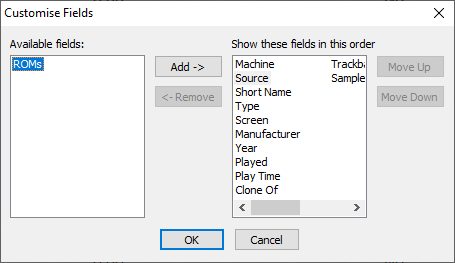
-
MAMEUI request: parent/clone universal icon color
mame-licious replied to mame-licious's topic in MameUI
Hi! First, it's great working with you since you actively listen to users and implement changes! I just love the new icons approach. I have several questions here: - how can a checkbox have 3 states? I never used/saw it and according to me you can only check/uncheck it. So I need explanation in order to understand the next release How to enable the intermediate state of a checkbox? I think not many people know a 3-state checkbox, so you are creating confusion here, just by using it. Are you interested to replace it with 3 radiobuttons (one for each state, and of course 1 can be enabled, the other 2 get disabled automatically)? According to me much better and no confusion. - what do you mean by "driver" icons? I only know about the icons (green/red/yellow, see issue about missing icons) that were shipped with John IV's version of MAMEUI. Are those the driver icons? I need to know this in order to test the next release You are writing a lot of new information now and I can imagine users don't know how it all works. I will need to save the information too since I won't remember it all. Once John IV's version of MAMEUI had a CHM file included (see link). Would you be interested to update this file with this new information and include it with MAMEUI ? Where else can we find a sort of "manual" for MAMEUI?You could also update the "Art & Support Files" there with all the supported DAT files (since it's not up to date anymore) and remove some information like "Game changes" and "MAMEUI Changes" Is there a way to make tooltips appear when you go with the mouse over widgets? In that way you can write explanation for the new checkbox. https://limewire.com/d/UWkgJ#kEI9aro93I -
Few more changes with icons. A working bios gets the blue chip. The redx override setting has a 3-state checkbox (first time I've used one). - unticked = red/yellow/green chips, but if driver icons are found they will override for working games. - intermediate = same as above, but the red chip is replaced by red X. - ticked = driver icons will always be used. If there's no icon, then it falls back to intermediate. If you don't want driver icons at all, change your icon directory settings to point away from the icons or delete them.
-
This question has been asked before, and the answer is still the same: no. It's up to the community to provide non-essential extras.
-

Sonicmania Port (new xbox 360 release)
fumanchu replied to fumanchu's topic in XBOX 360 Hacks [/xbox360]
here you go has the dlc unlocked and has some mods as well. inlcudes mario mania mod and sparkster mod. link [code]https://www.mediafire.com/file/d7e9xvvpkzarfny/Sonic+Mania+Plus+(Modloader).7z/file[/code] -
new link [code]https://www.mediafire.com/file/avxtwx3hgqlgevf/SM64_60fps_Wide_128mb.rar/file[/code]
-
new link [code]https://www.mediafire.com/file/1v5muzty2iguzke/CannonballX.rar/file[/code]
-
 I’m not very familiar with arcade debugging, so I’m hoping to get some guidance. What I know so far: The palettes are located in: mm_c_04 (gng) gg4.bin (gngb) 10n.rom (makaimur) Arthur’s red/green (RG) values come from: 06 00 CA A8 75 54 88 66 44 99 84 60 AA C0 C7 00 Arthur’s blue (B) values come from: B0 00 80 60 00 00 A0 80 60 00 00 00 C0 00 00 00 Arthur’s palette is located at address $40. However, Arthur’s death animation frames load a different palette at $70, with the following values: RG: BB 00 33 45 57 69 A9 87 60 80 A0 B5 55 77 99 00 B: B0 00 80 A0 B0 C0 70 50 00 00 00 00 50 70 90 00 What I want to do: I want Arthur’s death animation to use his normal palette (the one at $40) instead of the alternate palette at $70.
 -
Sorry, this forum is so slow, my browser keeps loading forever and this post was added twice ...
-
Hi The support for HBMAME on progettosnaps is close to dead and there is no update in years. See https://www.progettosnaps.net/snapshots/othersets.php Since you maintain HBMAME and test the newly added games, would it be possible that you provide us with a snaps pack (only in-game gameplay screenshot) for HBMAME on the official HBMAME's website? You could add the newly added games (when you test them, you can make a screenshot at the same time) and slowly add the older ones.
-
MAMEUI feature request: more font & color settings
mame-licious replied to mame-licious's topic in MameUI
To clarify a bit, I'm interested in following changes with 1 -> 3 interest priority. And if all approved by you, I like them all 1 font & color for everything is according to me a bit too limited in mameui. So these changes could make the UI better: 1) a separate font & color for the history.xml text (and all DAT files on the same tabpage) 2) a separate font & color for the folders list (treeview) at the left 3) a choice background image (already existing now) OR background color for everything above and the game list -
MAMEUI official website: Icons folder missing
mame-licious replied to mame-licious's topic in MameUI
Solved in the other issue -
MAMEUI request: parent/clone universal icon color
mame-licious replied to mame-licious's topic in MameUI
Thanks so much! This is perfect and exactly the change I wanted. Now all confusion is gone, especially for beginning users. -
hi can you reupload it please?