All Activity
- Today
-
The website is back! ✨😄🙏 New version is coming soon!
- Yesterday
-

Ami/WinArcadia 36.32 & DroidArcadia 4.56 released
Minuous posted a topic in Emulator Releases [/emu]
WinArcadia 36.32 (Windows XP/Vista/7/8/10/11): 9 June 2026 DroidArcadia 4.56 (Android): 9 June 2026 AmiArcadia 36.32 (AmigaOS 3): 9 June 2026 AmiArcadia 36.32 (AmigaOS 4): 9 June 2026 AmiArcadia 36.31 (MorphOS): 2 June 2026 Super Bug Advance 1.31 (Game Boy Advance): 11 August 2025 AmiArcadia and WinArcadia are multi-emulators/assemblers/disassemblers of these machines: * Emerson Arcadia 2001 console family (Bandai, Emerson, Grandstand, Intervision, Leisure-Vision, Leonardo, MPT-03, Ormatu, Palladium, Poppy, Robdajet, Tele-Fever, Tempest, Tryom, Tunix, etc.) (c. 1982); * Interton VC 4000 console family (Acetronic, Cabel, Fountain, Hanimex, Interton, Prinztronic, Radofin, Rowtron, Soundic, Voltmace, Waddingtons, etc.) (c. 1978); * Elektor TV Games Computer (1979); * PIPBUG- and BINBUG-based machines (Electronics Australia 77up2 and 78up5, Signetics Adaptable Board Computer, Eurocard 2650, etc.) 1977-1978); * Signetics Instructor 50 trainer (1978); * Signetics TWIN minicomputer (1976); * Central Data 2650 microcomputer (1977); * PHUNSY microcomputer (c. 1980); * Ravensburger Selbstbaucomputer aka 2650 Minimal Computer trainer (1984); * Hofacker MIKIT 2650 trainer (1978); * Astro Wars, Galaxia, Laser Battle and Lazarian coin-ops by Zaccaria (1979-1981); * Malzak 1 and 2 coin-ops by Kitronix (c. 1981); * AY-3-8500/8550/8600-based Pong systems (Coleco Telstar Galaxy, Sheen TVG-201, etc.) (1976-1977); and * VTech Type-right machine (1985). Features include: ReAction GUI, load/save snapshots, windowed and full- screen modes, CPU tracing, trainer, drag and drop support, graphics scaling, automatic load/save of configuration/game, keyboard/joystick/ gamepad/paddle/mouse/trackball/Vision-dapter support, autofire, turbo mode, gameplay recording/playback, sprite demultiplexing, help windows, source code, debugger, frame skipping, redefinable keys, save screenshots (9 supported formats), REXX port, network play (IPv4 and IPv6), real-time monitor, locale support, game selection sidebar, text-to-speech, artefacting, support for ZIPped games, clipboard support, palette editor, memory editor, tone retuning, high score management, force feedback, sprite editor, 3D, assembler, CALM & IEEE-694 support, Scale2x/3x/4x and HQx filters, animation recording (4 supported formats), sound recording (8 supported formats), horizon dejittering, tape decks (4 supported formats), RetroAchievements support, printer emulation, floppy disk drive emulation, screen editor, papertape emulation, bezel display, industrial/scientific peripherals, magnifier. The supported languages are currently English, Dutch, French, German, Greek, Italian, Polish, Russian and Spanish. Changes since V36.31: Summary: * Added SYM CLI argument. * Miscellaneous improvements and bug fixes. Details: fixed: memory editor was corrupting host memory in some circumstances. laser battle, lazarian: fixed: unlimited time trainer did not work properly. disassembler: bitwise immediate values (eg. for ANDI,rn instruction) are now shown as binary rather than hexadecimal. wa: memory editor: keyboard input is no longer passed to guest. added SYM CLI argument. assembler: now recognizes more as2650-format assembler directives. interton: added unlimited time+ammo trainers for hunting and shooting gallery. arcadia: improved emulation of sprite-background collisions (improves combat). arcadia: added gaming guide link for robot killer. elektor: added unlimited time+ammo trainer for hunting. fixed: guide rays were sometimes being drawn multiple times or not at all. aa: mos: incorporated Stefan's latest makefile. incorporated Stefan's latest German translation. fixed: debugger help text was wrong for some languages. -------------------------------------------------------------------------- DroidArcadia is the Android port of the AmiArcadia/WinArcadia emulator. These machines are emulated: * Emerson Arcadia 2001 console family (Bandai, Emerson, Grandstand, Intervision, Leisure-Vision, Leonardo, MPT-03, Ormatu, Palladium, Poppy, Robdajet, Tele-Fever, Tempest, Tryom, Tunix, etc.) (c. 1982); * Interton VC 4000 console family (Acetronic, Cabel, Fountain, Hanimex, Interton, Prinztronic, Radofin, Rowtron, Soundic, Voltmace, Waddingtons, etc.) (c. 1978); * Elektor TV Games Computer (1979); * Astro Wars, Galaxia, Laser Battle and Lazarian coin-ops by Zaccaria (1979-1981); and * Malzak 1 and 2 coin-ops by Kitronix (c. 1981). Features include: artefacting, autofire, force feedback, frame skipping, game help, gamepad support, high score management, horizon dejittering, locale support, save screenshots, saved states, sprite demultiplexing, tone retuning, trainers, artefacting, support for ZIPped games, DIP switch editor, RetroAchievements support. The emulator can be used standalone, or with the ES-DE or LaunchBox frontends. The supported languages are currently English, Dutch, French, German, Greek, Italian, Polish and Spanish. Changes since V4.55: Summary: * Miscellaneous improvements and bug fixes. Details: laser battle, lazarian: fixed: unlimited time trainer did not work properly. interton: added unlimited time+ammo trainers for hunting and shooting gallery. arcadia: improved emulation of sprite-background collisions (improves combat). arcadia: added gaming guide link for robot killer. elektor: added unlimited time+ammo trainer for hunting. http://amigan.1emu.net/releases/ http://amigan.yatho.com -

NeoGeo Prototype Previews by Rou20221
Hyperscorpio replied to Hyperscorpio's topic in 1Emulation.com Information [/info]
BrianT told me on discord FBNeo group had this games hidden from the public, but I told him about Rou20221 so... The games don't have any NGH code and are incompleted should be in my opinion on hbmame released. We know people are really interested to play the Holygrail some day. I don't think NeoGeo AES+ will do something???? As we know SNK dies long ago and still the products are for sale on the Japanese stores very expensive. Less we see them closed. - Last week
-
Dirt Dash - Xbox 360 v1.0.0 for xbox 360. by wanszai original github release page [code]https://github.com/wanszai/Dirt-Dash-XBOX-360-Releases[/code] vid [code]https://www.youtube.com/watch?v=LKLHy-XPD3Q[/code] release info v1.0.0 This is the first release of Dirt Dash Xbox 360. This is an arcade emulator designed to run Namco's Dirt Dash on Xbox 360 hardware at full speed in HD with native 16:9 rendering. Dirt Dash is a solo only game, there is no multiplayer at all in this game. The usual options apply; widescreen/4:3 toggle, Controller/Steering Wheel toggle, customisable controls etc. Known issues: Slow down in the cave midway section when transitioning from day to night. HUD elements in the second attract are not correct. link below contains emulator and rom and bios. [code]https://www.mediafire.com/file/b3o7yifvhsvukre/Dirtdash360.rar/file[/code]
-
Just tested MAMEUI XP version from your site on my XP machine, and it works fine. For the 3-state checkbox, instead of the little square you get a greyed-out tick. So you don't need to do anything.
- Earlier
-
Ami/WinArcadia 36.31 & DroidArcadia 4.55 released
Minuous posted a topic in Emulator Releases [/emu]
WinArcadia 36.31 (Windows XP/Vista/7/8/10/11): 2 June 2026 DroidArcadia 4.55 (Android): 2 June 2026 AmiArcadia 36.31 (AmigaOS 3): 2 June 2026 AmiArcadia 36.31 (AmigaOS 4): 2 June 2026 AmiArcadia 36.3 (MorphOS): 27 May 2026 Super Bug Advance 1.31 (Game Boy Advance): 11 August 2025 AmiArcadia and WinArcadia are multi-emulators/assemblers/disassemblers of these machines: * Emerson Arcadia 2001 console family (Bandai, Emerson, Grandstand, Intervision, Leisure-Vision, Leonardo, MPT-03, Ormatu, Palladium, Poppy, Robdajet, Tele-Fever, Tempest, Tryom, Tunix, etc.) (c. 1982); * Interton VC 4000 console family (Acetronic, Cabel, Fountain, Hanimex, Interton, Prinztronic, Radofin, Rowtron, Soundic, Voltmace, Waddingtons, etc.) (c. 1978); * Elektor TV Games Computer (1979); * PIPBUG- and BINBUG-based machines (Electronics Australia 77up2 and 78up5, Signetics Adaptable Board Computer, Eurocard 2650, etc.) 1977-1978); * Signetics Instructor 50 trainer (1978); * Signetics TWIN minicomputer (1976); * Central Data 2650 microcomputer (1977); * PHUNSY microcomputer (c. 1980); * Ravensburger Selbstbaucomputer aka 2650 Minimal Computer trainer (1984); * Hofacker MIKIT 2650 trainer (1978); * Astro Wars, Galaxia, Laser Battle and Lazarian coin-ops by Zaccaria (1979-1981); * Malzak 1 and 2 coin-ops by Kitronix (c. 1981); * AY-3-8500/8550/8600-based Pong systems (Coleco Telstar Galaxy, Sheen TVG-201, etc.) (1976-1977); and * VTech Type-right machine (1985). Features include: ReAction GUI, load/save snapshots, windowed and full- screen modes, CPU tracing, trainer, drag and drop support, graphics scaling, automatic load/save of configuration/game, keyboard/joystick/ gamepad/paddle/mouse/trackball/Vision-dapter support, autofire, turbo mode, gameplay recording/playback, sprite demultiplexing, help windows, source code, debugger, frame skipping, redefinable keys, save screenshots (9 supported formats), REXX port, network play (IPv4 and IPv6), real-time monitor, locale support, game selection sidebar, text-to-speech, artefacting, support for ZIPped games, clipboard support, palette editor, memory editor, tone retuning, high score management, force feedback, sprite editor, 3D, assembler, CALM & IEEE-694 support, Scale2x/3x/4x and HQx filters, animation recording (4 supported formats), sound recording (8 supported formats), horizon dejittering, tape decks (4 supported formats), RetroAchievements support, printer emulation, floppy disk drive emulation, screen editor, papertape emulation, bezel display, industrial/scientific peripherals, magnifier. The supported languages are currently English, Dutch, French, German, Greek, Italian, Polish, Russian and Spanish. Changes since V36.3: Summary: * Debugger: enhanced "=" command. * Miscellaneous improvements. Details: incorporated Anthony's latest Greek translation. aa: added/replaced/removed various icons. arcadia: added knowledge about meditation homebrew. arcadia: added support for kotonoha tower homebrew (incl. glyph, overlay, infinite lives trainer, high score management). aa: arcadia: replaced high score table gadget grid with listbrowser. various code-level improvements. coin-ops: added data comment support for PVIs. wa: monitor: tooltips now show an interpretation of the current contents of the address. debugger: "=" command now shows an interpretation of the current contents of the address, where appropriate. aa: coin-ops: pvi(s) monitor: added tooltips. -------------------------------------------------------------------------- DroidArcadia is the Android port of the AmiArcadia/WinArcadia emulator. These machines are emulated: * Emerson Arcadia 2001 console family (Bandai, Emerson, Grandstand, Intervision, Leisure-Vision, Leonardo, MPT-03, Ormatu, Palladium, Poppy, Robdajet, Tele-Fever, Tempest, Tryom, Tunix, etc.) (c. 1982); * Interton VC 4000 console family (Acetronic, Cabel, Fountain, Hanimex, Interton, Prinztronic, Radofin, Rowtron, Soundic, Voltmace, Waddingtons, etc.) (c. 1978); * Elektor TV Games Computer (1979); * Astro Wars, Galaxia, Laser Battle and Lazarian coin-ops by Zaccaria (1979-1981); and * Malzak 1 and 2 coin-ops by Kitronix (c. 1981). Features include: artefacting, autofire, force feedback, frame skipping, game help, gamepad support, high score management, horizon dejittering, locale support, save screenshots, saved states, sprite demultiplexing, tone retuning, trainers, artefacting, support for ZIPped games, DIP switch editor, RetroAchievements support. The emulator can be used standalone, or with the ES-DE or LaunchBox frontends. The supported languages are currently English, Dutch, French, German, Greek, Italian, Polish and Spanish. Changes since V4.54: Summary: * Miscellaneous improvements. Details: arcadia: added knowledge about meditation homebrew. arcadia: added support for kotonoha tower homebrew (incl. glyph, overlay, infinite lives trainer, high score management). various code-level improvements. http://amigan.1emu.net/releases/ http://amigan.yatho.com -
It's not related to raine, but it allows to see almost all the machines of the 50+ last years, you actually download some basic virtual machine then select the machine you want to see, it eventually download it if you have the light version (and it's recommended to take the light version!), and voila. There are not many games inside although there is at least a chess game with the NeXT machine of openstep 4.0. There are also all the mac os versions from 1 to 9.2 and even the 1st version of mac os x, amiga, atari, probably all the machines you could think of are inside, and probably a lot you never knew existed! It's mostly about OS, so no consoles, but there is even some android versions inside too. https://virtualosmuseum.org/
-
 2x4b523p joined the community
 -
I was asked what is the list of new icon names, so here they are. I don't know which ones can be overridden, you'll just have to test it and see. Firstly look at (for MAMEUI) https://github.com/Robbbert/mameui/tree/master/src/osd/winui/res , with a similar location for the other projects, and take note of the files with extension of ico. The names are of the format xx-yy.ico, where xx is the icon group, and yy is the name in that group. lv = listview, and in them c = clone, p =parent, w = working, n = not working, i = imperfect, x = redX, and bios is obvious. lv-ru is for roms unknown, lv-rn is for roms missing. pr = the icons used in the property sheets when you adjust a game's settings. In ARCADE64, there's also pi for the property sheet index. so = the icons used in the loose software list. For the treeview, fp = folder parent icon when closed, and fc = folder child icon when closed. When open, you get "fp-open" for every folder. Again, it shouldn't be hard to figure out what does what. Some of the folder children are hard-coded in the program and might not change as you would expect.
-
Thanks, will apply that on next release... Maybe someone can test if 0.288 it's working without that change?
-
MAME, WOLFMAME AND MAMEUI 0.288 32bit available (Xp compatible). Download from: RETRODANUART MAME XP
-
Oops, that should be "change BS_AUTO3STATE to BS_AUTOCHECKBOX". Corrected original post. The path is: src/osd/winui/mameui.rc
-
 Cartok joined the community
 -
What's the full path to mameui.rc? found 4 different files but no STATE3BOX string inside of them.
-
* Qemu v10.0.10, v10.2.3, v11.0.1 [PC] - https://download.qemu.org/ * MEmu v9.5.3 [Android] - https://www.memuplay.com/blog/en/category/release-notes * AppleWin v1.32.0.0 [Apple II] - https://github.com/AppleWin/AppleWin/releases * Hypseus v2.12.0 [Arcade] - https://github.com/DirtBagXon/hypseus-singe/releases * Wolfmame 0.288 - https://github.com/mahlemiut/wolfmame/releases * GearColeco v1.6.2 [Colecovision] - https://github.com/drhelius/Gearcoleco/releases * CCS64 v4 [Commodore 64] - http://www.ccs64.com/ * Yape v1.3.0 [Commodore Plus/4] - http://yape.homeserver.hu/ * Xroar v1.11 [Dragon 64/Tandy CoCo] - http://www.6809.org.uk/xroar/ * Gearboy v3.8.5 [Gameboy] - https://github.com/drhelius/Gearboy/releases * Pyboy v2.7.1 [Gameboy] - https://github.com/Baekalfen/PyBoy/releases * NanoboyAdvance v1.8.3 [GBA] - https://github.com/nba-emu/NanoBoyAdvance/releases * ClownMDemu v1.6.11 [Genesis] - https://github.com/Clownacy/clownmdemu-frontend/releases * GearSystem v3.9.8 [Genesis] - https://github.com/drhelius/Gearsystem/releases * GearLynx v1.2.12 [Atari Lynx] - https://github.com/drhelius/Gearlynx/releases * Bizhawk v2.11.1 [Multi-system] - https://github.com/TASEmulators/BizHawk/releases * JGenesis v0.12.1 [Multi-system] - https://github.com/jsgroth/jgenesis/releases * MAMEUI64 0.288.0 - https://messui.1emulation.com/ * ARCADE64 0.288.0 - https://messui.1emulation.com/arcade * Gopher64 v1.1.22 [N64] - https://github.com/gopher64/gopher64/releases * MAME 0.288 - https://www.mamedev.org/release.html * GearGrafx v1.7.8 [PC Engine] - https://github.com/drhelius/Geargrafx/releases * PPSSPP v1.20.4 [Sony PSP] - https://github.com/hrydgard/ppsspp/releases * Simcoupe v1.2.16 [Sam Coupe] - https://github.com/simonowen/simcoupe/releases * Simple Launcher v5.5.0 [Front End] - https://github.com/drpetersonfernandes/SimpleLauncher/releases * dgVoodoo v2.87.2 [Plugin] - http://dege.freeweb.hu/dgVoodoo2/dgVoodoo2/ * RomVault v3.7.5 [Rom Manager] - https://www.romvault.com/
-
MAMEUI64 0.288.0 has been released. Available at https://messui.1emulation.com Changes: - Lots of updates with the icons. For more, see - shine/1 computer: added cassette interface with motor control - updated to C++20 Please note, you'll need windows 10 to run this (it might work on windows 8, but not able to test it).
-
MAMEUI and HBMAMEUI have all been given a makeover with the icons that are used in the treeview (the left pane) and the listview (the list of games in the middle). 1. Very first thing when upgrading which you MUST do. In your "folders" folder, you have to delete these files: BIOS.ini, CPU.ini, Dumping.ini, Manufacturer.ini, Refresh.ini, Resolution.ini, Screen.ini, Sound.ini, Source.ini and Year.ini . If you don't, you'll get duplicate rubbish in the treeview. 2. Ensure that your "folders" folder is not shared among emulators and old versions. Cache files get created here and the content depends on the emulator, leading to misleading results if viewed in another emulator or version. Cache files have similar names to the ones listed above, but with no "ini" extension. 3. The internal icons all have new names, so if you used external icons to override the internal ones, your external icons will all need renaming. 4. If you have custom ini files in "folders", you can now specify to use internal icons for them if desired, or keep using the external icon as before. The default icon will be "custom" (a yellow folder with a small red asterisk). 5. In the Interface Options, one option is "Override Not Working icon with driver icon". This uses a 3-state checkbox, and it only applies to the listview. If you do not use an external icons.zip/7z these are the meanings: 5.1 if blank, you get icons that look like 8-legged integrated circuits. Dark green = working parent; Light green = working clone; Blue = Bios; Yellow = imperfect parent; Light yellow = imperfect clone; Red = Not-working parent; Pink = Not-working clone; grey with stop sign = Roms are missing; grey with question mark = need to be audited. 5.2 if a small square or a tick, same as above except that the red chip is replaced by a red X. If you DO use external per-driver icons, these are the meanings: 5.3 if blank, same as 5.1 but if a driver icon is found for a working or imperfect game, it is used instead. 5.4 if a small square, same as 5.3, except that the red chip is replaced by a red X. 5.5 if ticked, same as 5.4, but the red icon is replaced by the driver icon if it exists. 6 Bioses have no indication if they work or not. 7. Bioses no longer appear in the listview. To see them, click on the BIOS folder. 8. Games that crash, freeze, or fatal-error at start or soon after, are not included in the build. For MAMEUI, these are currently: imac, touma560, touma568, racjamdx, hmxpro, ibmpcjx, camirf1, pegasos2, sun_s10, sun_s20. ARCADE64 has had a similar change with the icons, these are explained in a separate topic in the ARCADE subforum. Note: If you want to compile for an old OS but find that it can't support a 3-state checkbox, open mameui.rc and change BS_AUTO3STATE to BS_AUTOCHECKBOX. You'll lose the "small square" choice. Microsoft state that Vista is the minimum version, however it is known that the minimum version information is often incorrect.
-
Zelda – A Link To The Past X by Team-Resurgent original github page [code]https://github.com/Team-Resurgent/Zelda-A-Link-To-The-Past-X[/code] [quote]A native Original Xbox port of zelda3, the open-source decompilation of The Legend of Zelda: A Link to the Past. Runs natively on Original Xbox hardware using Direct3D 8, DirectSound and XInput. Core Game Full game playable from start to end 60fps gameplay 720p output (falls back to 480p if not supported by your TV) 4:3 and 16:9 widescreen support Xbox-Specific Features In-game menu — Press L3 (left stick click) to open Save states — 10 save slots, fully integrated with the Xbox Dashboard memory manager. Delete individual save states directly from the dashboard. Dashboard-managed saves — SRAM and all save states appear in the Xbox Dashboard under Memory → Hard Drive. Users can copy saves to a memory unit or delete them from there. Turbo mode — Runs the game at 4x speed Pause with dim overlay Cheats menu — God mode (health, magic, bombs, arrows, rupees), fill/upgrade items, equipment and bottle management Settings menu — Toggle all enhanced features in-game Enhanced Features (toggleable in Settings) Dim flashes No low health beep Mirror to Dark World Turn while dashing Break pots with sword (Master Sword or better required) Collect items with sword Skip intro Show max items in yellow Carry 9999 rupees 4 active bombs Misc bug fixes Game-changing bug fixes Cancel bird travel Switch L/R item slots (secondary item slot system)[/quote] link below(includes all files) [code]https://www.mediafire.com/file/xbc57tlf2mxh1tk/zelda+-+a+link+to+the+past+x.zip/file[/code]
-
Super-Mario-World-X port by Team-Resurgent. github page [code]https://github.com/Team-Resurgent/Super-Mario-World-X[/code] [quote] A native Original Xbox port of super mario world, the open-source decompilation of Super Mario World. Also includes Super Mario Bros. 1 and Super Mario Bros. Lost Levels via the Super Mario All-Stars ROM. Runs natively on Original Xbox hardware using Direct3D 8, DirectSound and XInput. Xbox-Specific Features In-game menu — Press L3 (left stick click) to open Save states — 10 save slots per game, fully integrated with the Xbox Dashboard memory manager. Delete individual save states directly from the dashboard. Dashboard-managed saves — SRAM and all save states appear in the Xbox Dashboard under Memory → Hard Drive. Users can copy saves to a memory unit or delete them from there. Switch Game — Switch between Super Mario World, SMB1 and SMBLL from the in-game menu Turbo mode — Runs the game at 4x speed Pause with dim overlay Cheats menu — Add lives, power-ups and coins for all three games Settings menu — Toggle display mode and sprite limits in-game[/quote] link below(includes all the files for smw and both the other mario games) [code]https://www.mediafire.com/file/lxwrcc681kn6vho/super+mario+world+x.zip/file[/code]
-
WinArcadia 36.3 (Windows XP/Vista/7/8/10/11): 27 May 2026 DroidArcadia 4.54 (Android): 27 May 2026 AmiArcadia 36.3 (AmigaOS 3): 27 May 2026 AmiArcadia 36.3 (AmigaOS 4): 27 May 2026 AmiArcadia 36.2 (MorphOS): 19 May 2026 Super Bug Advance 1.31 (Game Boy Advance): 11 August 2025 AmiArcadia and WinArcadia are multi-emulators/assemblers/disassemblers of these machines: * Emerson Arcadia 2001 console family (Bandai, Emerson, Grandstand, Intervision, Leisure-Vision, Leonardo, MPT-03, Ormatu, Palladium, Poppy, Robdajet, Tele-Fever, Tempest, Tryom, Tunix, etc.) (c. 1982); * Interton VC 4000 console family (Acetronic, Cabel, Fountain, Hanimex, Interton, Prinztronic, Radofin, Rowtron, Soundic, Voltmace, Waddingtons, etc.) (c. 1978); * Elektor TV Games Computer (1979); * PIPBUG- and BINBUG-based machines (Electronics Australia 77up2 and 78up5, Signetics Adaptable Board Computer, Eurocard 2650, etc.) 1977-1978); * Signetics Instructor 50 trainer (1978); * Signetics TWIN minicomputer (1976); * Central Data 2650 microcomputer (1977); * PHUNSY microcomputer (c. 1980); * Ravensburger Selbstbaucomputer aka 2650 Minimal Computer trainer (1984); * Hofacker MIKIT 2650 trainer (1978); * Astro Wars, Galaxia, Laser Battle and Lazarian coin-ops by Zaccaria (1979-1981); * Malzak 1 and 2 coin-ops by Kitronix (c. 1981); * AY-3-8500/8550/8600-based Pong systems (Coleco Telstar Galaxy, Sheen TVG-201, etc.) (1976-1977); and * VTech Type-right machine (1985). Features include: ReAction GUI, load/save snapshots, windowed and full- screen modes, CPU tracing, trainer, drag and drop support, graphics scaling, automatic load/save of configuration/game, keyboard/joystick/ gamepad/paddle/mouse/trackball/Vision-dapter support, autofire, turbo mode, gameplay recording/playback, sprite demultiplexing, help windows, source code, debugger, frame skipping, redefinable keys, save screenshots (9 supported formats), REXX port, network play (IPv4 and IPv6), real-time monitor, locale support, game selection sidebar, text-to-speech, artefacting, support for ZIPped games, clipboard support, palette editor, memory editor, tone retuning, high score management, force feedback, sprite editor, 3D, assembler, CALM & IEEE-694 support, Scale2x/3x/4x and HQx filters, animation recording (4 supported formats), sound recording (8 supported formats), horizon dejittering, tape decks (4 supported formats), RetroAchievements support, printer emulation, floppy disk drive emulation, screen editor, papertape emulation, bezel display, industrial/scientific peripherals, magnifier. The supported languages are currently English, Dutch, French, German, Greek, Italian, Polish, Russian and Spanish. Changes since V36.2: Summary: * "Help|Host gamepad(s)/mouse..." subwindow: added Logitech Dual Action options (WinArcadia only). * Miscellaneous improvements and bug fixes. Details: interton: added gaming guide link for crazy crab. host pad(s) subwin: group labels now show which guest player each host pad/mouse is assigned to. wa: host pad(s) subwin: added "view as logitech dual action" options for each host gamepad. wa: host pad(s) subwin: fixed: memory for image was never being freed. host pad(s) subwin: user can now click on mouse buttons with mouse to give input. controls subwin: fixed: hovering over paddle direction areas was causing a crash/hang. interton: added unlimited lives, unlimited time/energy and invincibility trainers for munch & crunch. interton: improved overlay/instructions and host gamepad button assignments for munch & crunch. titlebar now says "(paused during frame)" instead of just "(paused)" when pausing mid-frame. wa: host pads subwin: added helpful tooltips for unassigned gamepads. wa: now when detecting user activity on an unassigned gamepad, assigns that gamepad automagically to the default player. debugger: now prepends hex values with $ rather than the style-specific prefix. fixed: guide ray position was not being updated after eg. several "run to rastline" commands in the same frame. wa: uvi/pvi monitor: tooltips now show an interpretation of the current contents of the address. -------------------------------------------------------------------------- DroidArcadia is the Android port of the AmiArcadia/WinArcadia emulator. These machines are emulated: * Emerson Arcadia 2001 console family (Bandai, Emerson, Grandstand, Intervision, Leisure-Vision, Leonardo, MPT-03, Ormatu, Palladium, Poppy, Robdajet, Tele-Fever, Tempest, Tryom, Tunix, etc.) (c. 1982); * Interton VC 4000 console family (Acetronic, Cabel, Fountain, Hanimex, Interton, Prinztronic, Radofin, Rowtron, Soundic, Voltmace, Waddingtons, etc.) (c. 1978); * Elektor TV Games Computer (1979); * Astro Wars, Galaxia, Laser Battle and Lazarian coin-ops by Zaccaria (1979-1981); and * Malzak 1 and 2 coin-ops by Kitronix (c. 1981). Features include: artefacting, autofire, force feedback, frame skipping, game help, gamepad support, high score management, horizon dejittering, locale support, save screenshots, saved states, sprite demultiplexing, tone retuning, trainers, artefacting, support for ZIPped games, DIP switch editor, RetroAchievements support. The emulator can be used standalone, or with the ES-DE or LaunchBox frontends. The supported languages are currently English, Dutch, French, German, Greek, Italian, Polish and Spanish. Changes since V4.53: Summary: * Miscellaneous improvements. Details: interton: added gaming guide link for crazy crab. interton: added unlimited lives, unlimited time/energy and invincibility trainers for munch & crunch. interton: improved overlay/instructions and host gamepad button assignments for munch & crunch. http://amigan.1emu.net/releases/ http://amigan.yatho.com
-
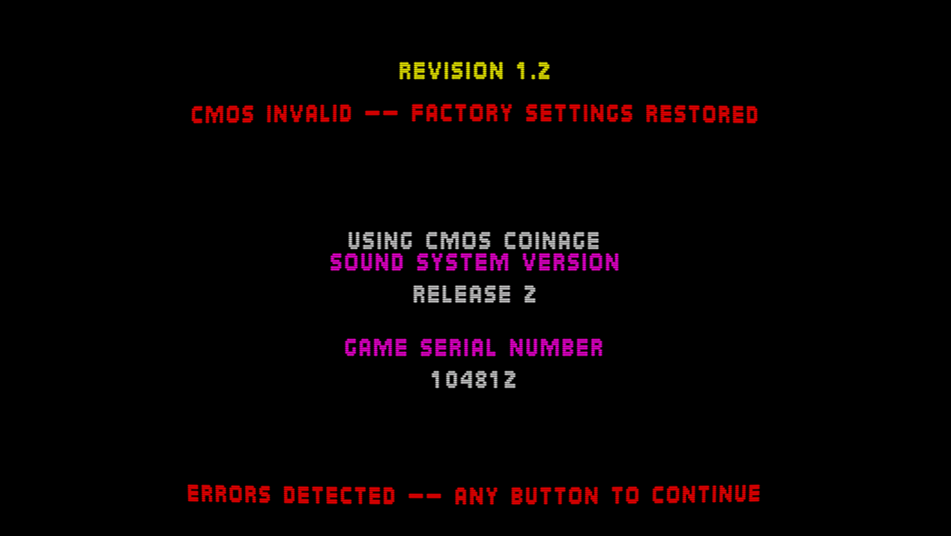
Just tried umk3, settings are saved and restored correctly. Must be something in your setup. Make sure the path to nvram is fully qualified, not just "nvram".
-
Hi, not sure if this is from MAME in general or specific of MAMEUI, but lately my CMOS settings are not being saved, for example each time I boot UMK3 the settings are reset and I have to get into the Test Menu and change them.
-
WinArcadia 36.2 (Windows XP/Vista/7/8/10/11): 19 May 2026 DroidArcadia 4.53 (Android): 19 May 2026 AmiArcadia 36.2 (AmigaOS 3): 19 May 2026 AmiArcadia 36.2 (AmigaOS 4): 19 May 2026 AmiArcadia 36.11 (MorphOS): 29 April 2026 Super Bug Advance 1.31 (Game Boy Advance): 11 August 2025 AmiArcadia and WinArcadia are multi-emulators/assemblers/disassemblers of these machines: * Emerson Arcadia 2001 console family (Bandai, Emerson, Grandstand, Intervision, Leisure-Vision, Leonardo, MPT-03, Ormatu, Palladium, Poppy, Robdajet, Tele-Fever, Tempest, Tryom, Tunix, etc.) (c. 1982); * Interton VC 4000 console family (Acetronic, Cabel, Fountain, Hanimex, Interton, Prinztronic, Radofin, Rowtron, Soundic, Voltmace, Waddingtons, etc.) (c. 1978); * Elektor TV Games Computer (1979); * PIPBUG- and BINBUG-based machines (Electronics Australia 77up2 and 78up5, Signetics Adaptable Board Computer, Eurocard 2650, etc.) 1977-1978); * Signetics Instructor 50 trainer (1978); * Signetics TWIN minicomputer (1976); * Central Data 2650 microcomputer (1977); * PHUNSY microcomputer (c. 1980); * Ravensburger Selbstbaucomputer aka 2650 Minimal Computer trainer (1984); * Hofacker MIKIT 2650 trainer (1978); * Astro Wars, Galaxia, Laser Battle and Lazarian coin-ops by Zaccaria (1979-1981); * Malzak 1 and 2 coin-ops by Kitronix (c. 1981); * AY-3-8500/8550/8600-based Pong systems (Coleco Telstar Galaxy, Sheen TVG-201, etc.) (1976-1977); and * VTech Type-right machine (1985). Features include: ReAction GUI, load/save snapshots, windowed and full- screen modes, CPU tracing, trainer, drag and drop support, graphics scaling, automatic load/save of configuration/game, keyboard/joystick/ gamepad/paddle/mouse/trackball/Vision-dapter support, autofire, turbo mode, gameplay recording/playback, sprite demultiplexing, help windows, source code, debugger, frame skipping, redefinable keys, save screenshots (9 supported formats), REXX port, network play (IPv4 and IPv6), real-time monitor, locale support, game selection sidebar, text-to-speech, artefacting, support for ZIPped games, clipboard support, palette editor, memory editor, tone retuning, high score management, force feedback, sprite editor, 3D, assembler, CALM & IEEE-694 support, Scale2x/3x/4x and HQx filters, animation recording (4 supported formats), sound recording (8 supported formats), horizon dejittering, tape decks (4 supported formats), RetroAchievements support, printer emulation, floppy disk drive emulation, screen editor, papertape emulation, bezel display, industrial/scientific peripherals, magnifier. The supported languages are currently English, Dutch, French, German, Greek, Italian, Polish, Russian and Spanish. Changes since V36.11: Summary: * Enhanced "Help|Host gamepads/mouse..." subwindow. * Miscellaneous improvements and bug fixes. Details: "echo i/o to console?" toggle now emits an EOL when the VDU cursor has wrapped (helps with funny farm races). fixed: when loading a game for a different guest, eg. from sidebar, narrow/wide setting was not being set according to the new guest. wa: host pads subwin: now uses a real photo of gameware gamepad. qwerty machines: when using guest keyboard mapping, now supports eg. Shift+L for backslash. wa: pausing via gamepad now waits until the end of the frame. wa: opcodes subwin: fixed: "hover..." text was in wrong position and not localized. wa: galaxia: fixed: some background areas were not being rendered correctly when enhanced skies was on. wa: updated RAIntegration from V1.4.0 to V1.4.2. host pads subwin: user can now click on pad buttons with mouse to give input. wa: host pads subwin now only shows one host gamepad if only one is connected. various code-level improvements. wa: fixed various bugs in controls subwin. arcadia: fixed: palladium keys were not being mapped correctly. incorporated Stefan's latest German translation. wa: fixed: when using enhanced skies, changing machines could leave remnant imagery on screen. debugger: COVER command: now prepends hex values with $ rather than the style-specific prefix. interton: added an unlimited lives trainer for monster man. -------------------------------------------------------------------------- DroidArcadia is the Android port of the AmiArcadia/WinArcadia emulator. These machines are emulated: * Emerson Arcadia 2001 console family (Bandai, Emerson, Grandstand, Intervision, Leisure-Vision, Leonardo, MPT-03, Ormatu, Palladium, Poppy, Robdajet, Tele-Fever, Tempest, Tryom, Tunix, etc.) (c. 1982); * Interton VC 4000 console family (Acetronic, Cabel, Fountain, Hanimex, Interton, Prinztronic, Radofin, Rowtron, Soundic, Voltmace, Waddingtons, etc.) (c. 1978); * Elektor TV Games Computer (1979); * Astro Wars, Galaxia, Laser Battle and Lazarian coin-ops by Zaccaria (1979-1981); and * Malzak 1 and 2 coin-ops by Kitronix (c. 1981). Features include: artefacting, autofire, force feedback, frame skipping, game help, gamepad support, high score management, horizon dejittering, locale support, save screenshots, saved states, sprite demultiplexing, tone retuning, trainers, artefacting, support for ZIPped games, DIP switch editor, RetroAchievements support. The emulator can be used standalone, or with the ES-DE or LaunchBox frontends. The supported languages are currently English, Dutch, French, German, Greek, Italian, Polish and Spanish. Changes since V4.52: Summary: * Miscellaneous improvements and bug fixes. Details: galaxia: fixed: some background areas were not being rendered correctly when enhanced skies was on. interton: added an unlimited lives trainer for monster man. http://amigan.1emu.net/releases/ http://amigan.yatho.com
-

MAMElicious - Home of MAME's INI Files
Robert replied to mame-licious's topic in Arcade Emulators [/pc/arcade]
Site was deleted by the user. -

Ace Driver Collection - v1.0.0 (New xbox 360 Release)
fumanchu replied to fumanchu's topic in XBOX 360 Hacks [/xbox360]
Ace Driver Collection v1.0.1 released Fixed an issue that prevented controller keys from being rebound. Fixed a polling issue that would kill acceleration when switching camera view. new link [code]https://www.mediafire.com/file/uyrsarwfnaejlwr/AceDriverCollection.rar/file[/code] -
Ace Driver Collection - v1.0.0 by wans zai release info This is the first release of the Ace Driver System 22 Collection for Xbox 360. This is an arcade emulator designed to run the Ace Driver games on Xbox 360 hardware at full speed in HD with native 16:9 rendering. What's in this build. Play both games, Ace Driver Racing Evolution and Ace Driver Victory Lap, in offline solo mode. First pass of the force feedback is implemented. In Victory Lap, I still need to map more addresses — right now it only tracks collisions. 16:9 / 4:3 toggle. Smooth / Sharp filter toggle. Scanlines toggle. Volume scaling. What's in progress. System Link / Online play. Car and difficulty select — difficulty currently only adds time and does not adjust AI behaviour. Further force feedback adjustments and mapping additional feedback offsets. link to github page [code]github.com/wanszai/Ace-Driver-Collection-X360-Releases[/code] youtube vid [code]https://www.youtube.com/watch?v=S9FWQDTUOok[/code] link(includes all the files and roms needed) [code]https://www.mediafire.com/file/bm5uom9dx1g9g8r/AceDriverCollection.rar/file[/code]
-
lua 5.5 has appeared in arch, but in 64 bits only for now, making the 32 bit version of raine output an error about an undefined reference to luaL_openselectedlibs when compiling from source. The workaround is to explicitly use lua5.4 and not just lua in the makefile, I have pushed a new commit for that. I guess most of those who use the PKGCONFIG for arch use the 64 bits version, so they shouldn't need an update.